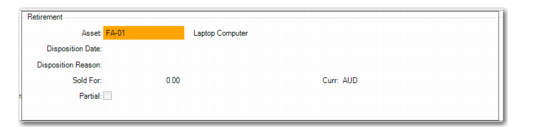
Retirement
Access this function by choosing Retire on the Option screen.
Use this function to retire an asset. Retirement removes the asset- acquisition cost from the books and posts any gains or losses to the GL.
Note: If depreciation has not been posted for this asset, delete the asset instead of retiring it.
After retiring the asset, the system calculates and displays values for Basis Amount, Accumulated Depreciation, Net Amount, and Gain/Loss on Disposal. Appropriate GL retirement transactions and reversing transactions are created to void future depreciation periods.
You can view the adjustments on the Depreciation Query screen by choosing the Audit function on the Depreciation Books screen. Run Fixed Asset Transaction Post to create unposted transactions. After you run Fixed Asset Transaction Post, you must run Operational Transaction Post (25.13.7) to update the GL.
Fixed Asset Maintenance, Retirement
Disposition Date
Enter the disposal date for the asset. The disposal date is the date the asset is removed from service and ownership interest is relinquished. If the asset is suspended as of the disposal date, you must reinstate the asset before retiring it.
The date must be a valid date in the GL calendar or any fixed‑asset calendar associated with the book. It must also be in an open GL period and must be after the service date.
Disposition Reason
Enter the reason for the disposal of the asset. The field is validated against codes set up in Generalized Codes Maintenance for field fa_disp_rsn.
Disposition reason is the reason the asset is removed from service and ownership interest relinquished. Examples of disposition reasons are sold, stolen, destroyed, donated, and impaired.
Sold For
Enter the amount received for the disposal of the asset. This amount is optional and used when calculating the gain or loss on the disposition of an asset.
Curr
Displays the currency of the fixed asset book, as defined in Book Maintenance.
Partial
If Yes, this is a partial retirement and you split the existing asset into two separate assets. The new asset created is retired.
If this is a partial retirement and the asset has only one component, enter either a percentage of the original cost in the Percent field or a currency amount in the Amount field.
Fixed Asset Maintenance, Partial Retirement illustrates this screen.
Fixed Asset Maintenance, Partial Retirement
New Asset ID
Enter a unique asset ID for the components being removed from the asset. If Auto Generate Asset is Yes in Fixed Asset Control, the system automatically assigns an asset ID using the predefined sequence defined in Number Range Maintenance.
Percent
If the asset has only one component, enter the percentage of the original asset cost to assign to the new asset. You can also enter a currency amount in Amount.
Amount
If the asset has only one component, enter the base currency amount to assign to the new asset. You can also enter a percentage of the original cost in Percent.
If this is a partial retirement and the asset has multiple components, the system displays a list of assets. By default, all components are selected.