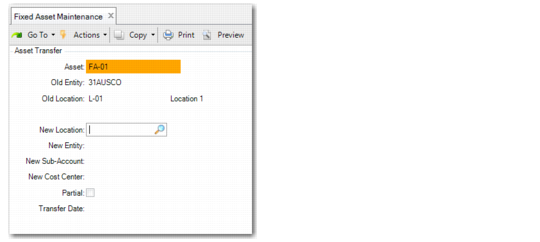
Asset Transfer
Access this function by choosing Trans on the Option screen.
Use this function to transfer an asset from one predefined location to another. The asset is transferred when you choose Move. Appropriate unposted transactions are created when you run Fixed Asset Transaction Post.
The new sub‑account and cost center default from the new location. The new cost center and sub‑account combination is validated with the accounts associated with the asset. You cannot complete the transfer if the combination is invalid.
Fixed Asset Maintenance, Asset Transfer
New Location
Enter a predefined location for the transferred asset. Define locations in Location Maintenance.
The entity, cost center, and sub‑account associated with this new location default for the transferred asset.
New Sub‑Account
Enter a valid, active sub‑account. Define sub‑accounts in Sub‑Account Create (25.3.17.1). The default is the sub‑account for the new location.
New Cost Center
Enter a valid, active cost center. Define cost centers in Cost Center Create (25.3.20.1). The default is the cost center for the new location.
Partial
If Yes, this is a partial transfer and you split the existing asset into two separate assets. The new asset created is transferred.
Transfer Date
Enter the effective date for the transfer. This date determines the year and period of the GL transaction.
The transfer date must be a valid date in the GL calendar and any fixed‑asset calendars associated with the asset books. It must also be in an open GL period and must be after the service date.
If this is a partial transfer and the asset has only one component, enter either a percentage of the original cost in the Percent field or a currency amount in the Amount field. This is exactly the same screen that displays when you do a partial retirement. See
Fixed Asset Maintenance, Partial Retirement for detailed field descriptions.
If this is a partial transfer and the asset has multiple components, the system displays a list of components. By default, all components are selected. Modify the selection as needed and click Next to continue.