Voiding GL Transactions
Use Fixed Asset Transaction Void (32.14) to correct errors for unposted depreciation, transfers, retirements, and adjustments. Reversing fixed-asset transactions are generated for the original entries created by Fixed Asset Transaction Post. You must run Operational Transaction Post (25.13.7) to update the GL.
You can void fixed-asset transactions only if the GL is open for the period you want to void. You cannot void entries for periods before the last posted period unless the last posted period is voided first. You must use the Fixed Asset Transaction Post function to repost the voided periods.
If you set Void Transactions to Yes, the system posts the resulting GL transactions to the daybook defined in Posting Book Daybook Maintenance (32.9) for the posting book and entity. If the system cannot find a daybook linked to the current entity, then it uses a daybook linked to a blank entity. If the system cannot find a daybook linked to the current entity or a daybook linked to a blank entity, it posts the GL transaction to the system daybook defined in Default Daybook Maintenance (25.8.4).
Unposted fixed-asset transactions are created for voids that affect posting books. For voided depreciation, the fixed-asset transactions reverse the postings for accumulated depreciation and depreciation expense.
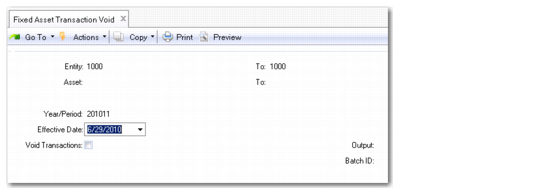
Fixed Asset Transaction Void (32.14)
Most fields in this function are similar to those in Fixed Asset Transaction Post, except that you indicate if you want to void transactions rather than post them.
Void Transactions
This field determines whether GL transactions are voided.
No: The system generates the journal report and the fixed-asset transactions are not voided.
Yes: Fixed-asset transactions are voided and an audit trail is printed.