Maintaining Fixed Assets
This chapter describes how to maintain fixed assets.
Creating Fixed-Asset TransactionsCreate unposted fixed asset transactions for assets by entity.
GL Transactions in Fixed AssetsDescribes the transactions created when you run Fixed Asset Transaction Post.
Creating Fixed-Asset Transactions
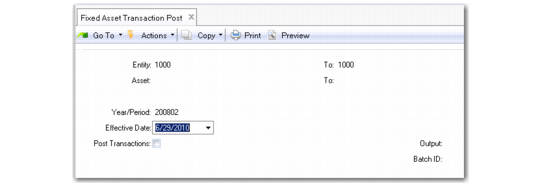
Use Fixed Asset Transaction Post (32.13) to create unposted fixed-asset transactions for assets by entity. Transactions are created for depreciation expenses, transfer, retirement of assets, and adjustments. After you run Fixed Asset Transaction Post, you must run Operational Transaction Post (25.13.7) to update the GL.
Note: Optionally, you can generate unposted GL transactions related to acquisition costs when you initially create fixed assets using Fixed Asset Maintenance (32.3) or Fixed Asset Batch Maintenance (32.7). See
Acquisition Costs.
At the end of each reporting period, run Fixed Asset Transaction Post to create unposted fixed-asset transactions. An audit trail report is created before creating unposted transactions. If necessary, make adjustments in Fixed Asset Maintenance and rerun Fixed Asset Transaction Post (32.13) for that period.
If you set Post Transactions to Yes, the system posts the GL transaction to the daybook defined in Posting Book Daybook Maintenance (32.9) for the posting book and entity. If the system cannot find a daybook linked to the current entity, it uses a daybook linked to a blank entity. If the system cannot find a daybook linked to the current entity or a daybook linked to a blank entity, it posts the GL transaction to the system daybook defined in Default Daybook Maintenance (25.8.4).
Accumulated depreciation and depreciation expenses from the posting book update the asset accounts, sub‑accounts, cost centers, and projects.
Fixed Asset Transaction Post creates unposted transactions for the following fixed-asset accounts:
• Asset
• Accumulated Expense
• Periodic Expense
• Gain on Disposal
• Loss on Disposal
• Asset Suspense
If transactions are created in error, use Fixed Asset Transaction Void (32.14) to reverse the entries. See
here.
To create the GL entries for the fixed-asset transactions, you must run Operational Transaction Post (25.13.7) for transaction type FA.
Fixed Asset Transaction Post (32.13)
Entity, To
Enter a range of entities to select transactions to be posted.
Note: If Entity is blank and you are using daybooks, you must first create a system daybook for a blank entity in Default Daybook Maintenance (25.8.4). Otherwise, an error displays and you cannot proceed.
Asset, To
Enter a range of asset IDs to select assets to be posted.
Effective
Enter the date when fixed‑asset transactions are effective in the GL. GL entries are created for the year/period. The effective date is validated against the open GL period. The default is the system date.
Post Transactions
This field determines whether transactions are posted to the GL.
Yes: A journal report is printed and the unposted transactions are created. GL entries post summary or detail information according to the Summarized Journal field in Fixed Asset Control.
No: The system generates the journal report and the unposted transactions are not created.
If any errors occur, an error report is generated with the problematic journals and no unposted transactions are created. You must fix the errors and run the Fixed Asset Transaction Post function again.