QAD 2017 Enterprise Edition
>
User Guides
>
Fixed Assets
>
Maintaining Fixed Assets
>
Deleting and Archiving Fixed Assets
Deleting and Archiving Fixed Assets
Use Retired Asset Delete/Archive (32.23) to delete and archive retired assets.
Historical information is not automatically deleted at period or year end. It is up to you to delete this information, as frequently as you prefer. Most companies keep historical information for at least one year, depending on availability of disk space.
Usually a delete/archive function is run twice. First run it with Delete set to No and review the report. Then run it with Delete set to Yes.
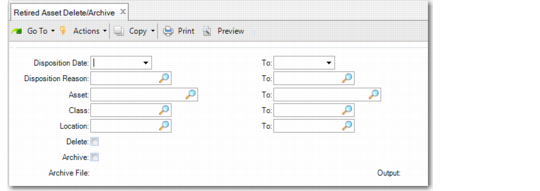
Retired Asset Delete/Archive (32.23)
Disposition Date, To
Enter a range of disposition dates to select retired assets to delete or archive.
Disposition Reason, To
Enter a range of disposition reasons to select retired assets to delete or archive.
Asset, To
Enter a range of asset IDs to select retired assets to delete or archive.
Class, To
Enter a range of class IDs to select retired assets to delete or archive.
Location, To
Enter a range of location IDs to select retired assets to delete or archive.
Delete
This field indicates whether to delete the selected records without generating a report.
Yes: The selected records are deleted from your database.
If you set Archive to Yes, the selected records are copied to an ASCII file before deletion. Use Archive File Reload to reload the data, if needed.
No: The selected records are not deleted. A report is generated listing the selected records.
Archive
This field indicates whether to archive the selected records.
Yes: The selected records are copied to an ASCII file. The system creates a file name in the following format: faYYMMDD.hst, where YYMMDD is the file creation date. If this file does not exist, it is created. If it does exist, it is modified.
No: The selected records are not copied to an ASCII file.
Note: Keep a record of the name of the file and its contents because there is no label within the file. The name of the file only identifies the module and the date the file was created. If you need to reload particular data, you must know the correct file name.