Fixed Assets Reports
This chapter describes the reports that let you view the status of your organization’s assets.
Asset Owned ReportView your company’s fixed assets in detail or summary.
Other Fixed Assets ReportsSummarizes other fixed asset reports.
Asset Owned Report
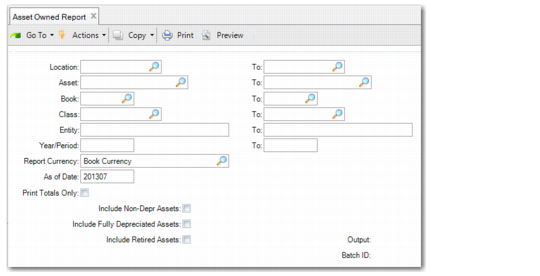
Use Asset Owned Report (32.5.11) to view all your company’s fixed assets in detail or summary form. Use the selection criteria to limit the information reported.
If you enter an As of Date that is after the last depreciable period, then the accumulated depreciation calculation is based on the last depreciable year period.
Note: If the asset uses the units‑of‑production depreciation method and no actual period units exist for the date entered in the As of Date, the accumulated depreciation is calculated by multiplying the accumulated units by the unit cost. If actual period units do exist for the As of Date, then accumulated depreciation is determined from the fixed asset book depreciation detail record that contains the actual period units.
Asset Owned Report (32.5.11)
Year/Period, To
Enter a range of periods for selecting assets for reporting. The format is YYYYXX, where YYYY is the year and XX is the period.
Note: This date range is used only for selecting records. The system uses the value specified in As of Date to determine the accumulated depreciation to be included in the report.
When the posting book is used for reporting, the system uses the GL calendar to obtain the report output based on the specified year and period range. When a non-posting book is used, the system uses the associated fixed-asset calendar. If one is not available, the GL calendar is used just as with posting book report output.
Report Currency
Select the currency in which to display the report amounts. The options are:
• Book Currency
• Base Currency
• Statutory Currency
As of Date
Enter the effective year and period for this report. The default is the year and period associated with today’s date in the GL calendar. The format is YYYYXX, where YYYY is the year and XX is the period.
The system calculates accumulated depreciation up to this year and period.
Print Totals Only
Indicate whether you want a summary or detail report of your company’s assets. This is a required entry.
No: The report prints the details for each individual asset.
Yes: The report prints a summary report for your company’s assets.
Include Non-Depreciating Assets
Specify whether to include non-depreciating assets in this report.
Include Fully Depreciated Assets
Specify whether to include fully depreciated assets in this report based on the year/period range.
No: Fully depreciated assets are not included in this report regardless of the year/period range.
Yes: Fully depreciated assets are included in this report when the life of the fully depreciated assets spans the specified year/period range. To include all fully depreciated assets in the system, set this field to Yes and leave the year/period range blank.
Include Retired Assets
Specify whether retired assets are included in this report based on the year/period range and the disposition date of the assets.
No: Retired assets are not included in this report when their disposition date is prior to the end of the specified year/period range. If the disposition date is after the end of the range, the assets are included in the report.
Yes: Retired assets are included in this report when the life of the retired assets spans the specified year/period range. To include all retired assets in the system, set this field to Yes and leave the year/period range blank.