QAD 2017 Enterprise Edition
>
User Guides
>
Global Tax Management
>
Implementing GTM
>
Multiple Language Descriptions
Multiple Language Descriptions
The core set of tax codes are defined at the system level and can be used within any domain. These include tax types, tax zones, tax classes, tax usages, and tax environments.
If you have implemented multiple domains with different associated languages within a single QAD database, you can define descriptions for tax codes in all required languages. With this setup, when users in a specific domain select tax codes, they see the description in their own language. Since the codes themselves are often numeric, the description is essential for understanding the purpose of the code.
Example: When a user with the French language associated selects a tax type browse, they will see the tax type descriptions in the French language.
Once you have set up the descriptions in multiple languages, they are displayed on all operational maintenance programs, browses, and reports that reference them.
The setup of language descriptions follows the same process in all supported programs.
1 The user logs in and creates a new tax code.
2 When the user saves the record, a label term is created and the description specified is associated with that label term for the user’s language.
3 The user is prompted regarding updating all languages.
If the response is No, only the record for the user’s language is created.
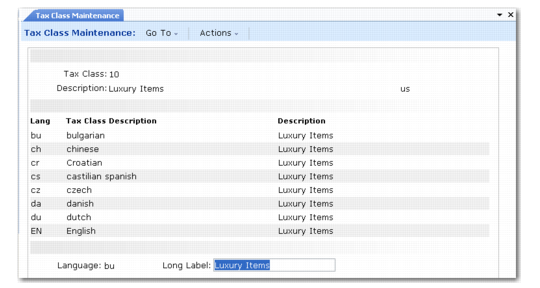
If the response is Yes, a frame displays data for each active language that can be modified by the user. This modification can be done when the code is created, or later when it is modified.
Since the data is being stored as label terms—the standard way all translated labels are managed for operational programs—the terms can be modified in Label Master Maintenance (36.4.17.1). With this approach, if the user creating the code does not have the expertise to provide translated descriptions, the translated descriptions can be defined directly in Label Master Maintenance.
Tax Description Terms lists the label format used for each tax code. In the format, UDT stands for User-Definable Translation.
Tax Description Terms
|
Tax Code
|
Label Format
|
|
Tax Class
|
UDT_TXCL_ user-defined description
|
|
Tax Environment
|
UDT_TXE_ user-defined description
|
|
Tax Type
|
UDT_TXT_ user-defined description
|
|
Tax Usage
|
UDT_TXU_ user-defined description
|
|
Tax Zone
|
UDT_TXZ_ user-defined description
|
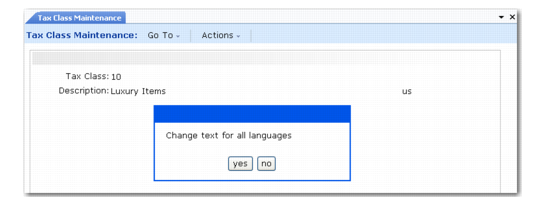
Tax Class Maintenance, Multi-language Descriptions illustrates setting up language descriptions in Tax Class Maintenance (29.1.5).
Tax Class Maintenance, Multi-language Descriptions
The language for the logged in user displays in the first frame, in this case US. Clicking Next displays the prompt to modify all languages. Specifying Yes displays a screen such as the following.
Tax Class Maintenance, Multi-language Descriptions
Edit the value in the Long Label field to specify the appropriate text for the selected language.