QAD 2017 Enterprise Edition
>
User Guides
>
Global Tax Management
>
Implementing GTM
>
Setting Up Tax Types
Setting Up Tax Types
Tax types are individually calculated and reported as regional taxes or tax exemptions. They apply to all domains in the database. Examples include Canadian PST/GST, California sales tax, federal excise tax. On transactions, the system calculates taxes for line items and trailer charges based on the tax types specified in their tax environments.
A separate tax type is required for each tax or tax exemption you report separately. For sorting, preface the type with the country code or state/province. The tax detail reports print in alphanumeric order by tax type code. Consider this when assigning codes for tax types.
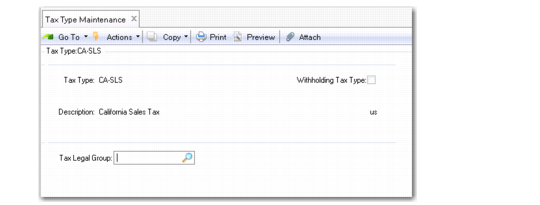
Set up tax types in Tax Type Maintenance (29.1.1). To verify data setup, use Tax Type Browse (29.1.2) and Report (29.1.3).
Tax Type Maintenance (29.1.1)
Tax Type
Enter a code (maximum 16 characters) identifying a tax or tax exemption that is separately calculated and reported to a specific jurisdiction.
Description
Enter a brief (maximum 24 characters) description of the tax type. This field is required.
Multiple language descriptions are supported. See
Multiple Language Descriptions for details.
Withholding Tax Type
Select the field if the tax type will be used for withholding tax calculations.
You must not clear the Withholding Tax Type field if postings have been made using a tax rate that is defined with this tax type.
Tax Legal Group
Specify a tax legal group to link a tax type that you intend to use on legal documents to that group. For more information on legal documents, see
QAD Sales User Guide.