QAD 2017 Enterprise Edition
>
User Guides
>
Global Tax Management
>
Implementing GTM
>
Setting Up Tax Bases
Setting Up Tax Bases
By default, tax is based on 100% of the item amount, exclusive of any other tax amounts. However, an item’s tax can be based on some amount that is greater or less than the item amount. In these situations, set up a tax base record.
Note: Tax base records apply only to the domain where they are created.
A tax base record is required whenever tax is based on a percentage of the item amount. A tax base is also required whenever tax is based on the item amount plus a previously calculated tax amount. This situation is sometimes called
tax-on-tax. See
Tax-on-Tax.
Here are two examples:
• In Brazil, when you sell an old fixed asset and replace it with a new one, tax is assessed on a percentage of the old asset’s sale price.
• In some Canadian provinces, PST (Provincial Sales Tax) includes the GST (Goods and Services Tax) in the taxable base for PST.
Assign a tax base to multiple tax types and tax rates if the percentage of value is the same for all situations. When you assign a tax type to a tax base, the tax base becomes part of all tax environments that use the tax type.
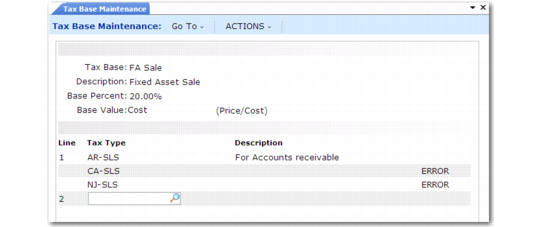
Set up tax bases in Tax Base Maintenance (29.1.13), shown in
Tax Base Maintenance (29.1.13). To verify data setup, use Tax Base Inquiry (29.1.14) and Report (29.1.15).
Tax Base Maintenance (29.1.13)
Tax Base
Enter a code (maximum eight characters) that identifies an item amount subject to tax. This amount can either be a percentage of sales price or the sales price plus other tax amounts. For a tax-on-tax situation, set up the tax base for the tax that is included in the taxable base for the other tax.
Once you start processing transactions with GTM, a warning message displays if you try to update a tax base that has already been used in other records.
Description
Enter a brief (maximum 24 characters) description of the tax base. The description prints on most reports and browses, as space permits.
Base Percent
Identify the percentage of the item’s price or cost to use in tax calculations for this tax base. The default value is 100%. Percentages can be either positive or negative. Negative percentages indicate tax credits. The base percent must be the same for all tax types assigned to the tax base. Otherwise, you must set up separate tax bases.
On transactions, the system uses the base percent for the tax type to calculate the taxable base amount for each line item or trailer charge.
Base Value
Identify the type of item amount for the taxable base. Line item and trailer charge amounts are taxed based on the price at which you buy or sell them. GTM does not support tax based on general ledger cost.
Important: Do not change this setting. The only supported type is sales price.
Line
The system automatically assigns a line number when you assign a tax type to the tax base. Assign up to 99 tax types to a tax base. When you add a new tax base, the system assigns the next sequential line number. To display a previously entered tax type, enter its line number.
Tax Type
Assign one or more tax types to this tax base. During tax calculations, the tax rate for the tax type is applied to the taxable base portion of the item amount.
The description of the tax type displays next to it.