Golden Tax Workflow
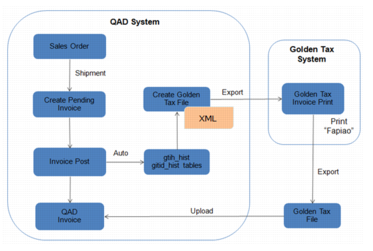
Typical Golden Tax workflow is illustrated in
Golden Tax Typical Workflow.
Golden Tax Typical Workflow
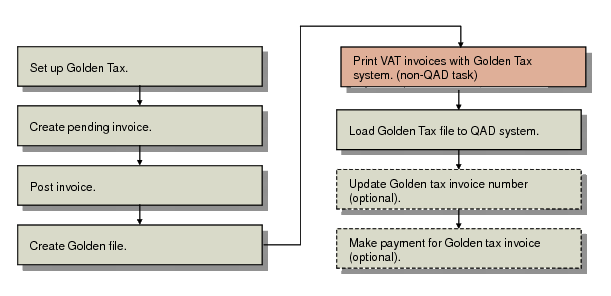
Golden Tax Invoicing Flow illustrates the steps to integrate with the Chinese Golden Tax system.
Golden Tax Invoicing Flow
This workflow includes the following steps:
1 Define data required for the operation of the Golden Tax system.
2 Pending invoices are created automatically when items on a sales order are shipped, or manually in Pending Invoice Maintenance (7.13.1).
3 Post invoice using Invoice Post and Print (7.13.4) to generate Golden Tax invoice tax in related tables.
4 Create Golden Tax file in XML format to be uploaded to the Golden Tax system for invoice printing.
5 Use the Golden Tax system to print VAT invoices and output a data file of the printed invoices.
6 Import the file into your QAD database using Golden Tax File Load (7.13.20.1.3).
7 Optionally, manually enter Golden Tax Invoice number in Customer Invoice Modify (27.20.1.2).
8 Optionally, make payment against the Golden Tax invoice number in the following payment programs:
• Customer Payment Create (27.6.4.1)
• Banking Entry Create (31.1.1) or Petty Cash Create (31.2.1)
• Open Item Adjustment Create (25.13.5)