Withholding Tax Reports
Three withholding tax reports are available:
• Withholding Tax Report
• Compensation to Third Party Report
• Withholding Tax Certificate Report
Withholding Tax Report
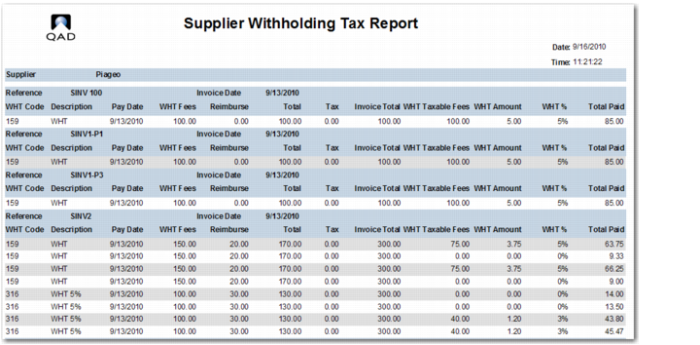
The Withholding Tax report displays supplier invoices that are subject to withholding tax within an entity, sorted by supplier by payment, together with details of all withholding taxes and associated amounts for each invoice.
The output from the report lists the appropriate withholding tax invoices together with their fees, expenses, the withholding tax rate, the withholding tax amounts, and the total amounts paid to the supplier. The report also shows the taxable base that is subject to withholding tax.
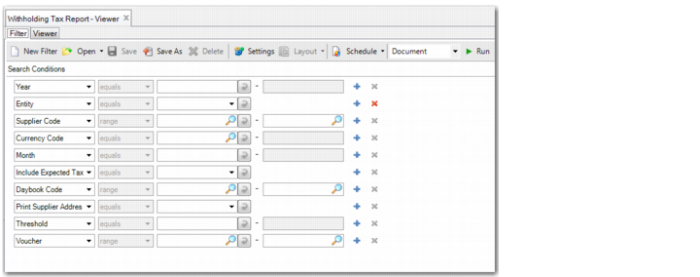
Withholding Tax Report, Selection Criteria
The report has the following selection criteria:
• Year
Specify the GL calendar year for which to run the report. The report only selects withholding tax records with a paid date in the year you specify. The default is the current GL calendar year.
You can leave the Year field blank; the report selects records from all years.
• Entity
Select the entity for which you want to run the report. The default is the current entity.
• Supplier Code
Specify the suppliers for which you want to run the report. If you leave the field blank, the system runs the report for all suppliers subject to withholding tax.
• Currency Code
Specify the currency for which to run the report.
• Month
Specify the month for which to run the report. The report only selects withholding tax records with a paid date in the year and month you specify in the Year and Month fields. The default is the current month.
You can leave the Month field blank; the report selects records from all months.
• Include Expected Tax
Select Yes or No (default). This field determines whether the report must include withholding tax records with the Initial status.
If you select Yes, withholding tax records with the Initial status are included on the report, irrespective of the date selection criteria.
• Daybook Code
Specify the daybooks for which you want to run the report. If you leave the field blank, the system runs the report for all supplier invoice daybooks.
• Print Supplier Address
Select Yes to print the full supplier addresses on the report.
• Threshold
Specify the withholding tax threshold for payments on service invoices. See
Withholding Tax on Services.
• Voucher
Specify the range of vouchers for which to run the report.
Supplier Withholding Tax Report
Compensation to Third-Party Report
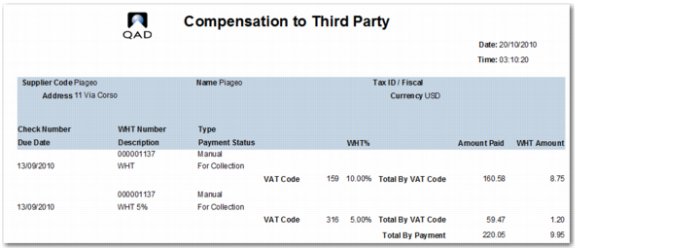
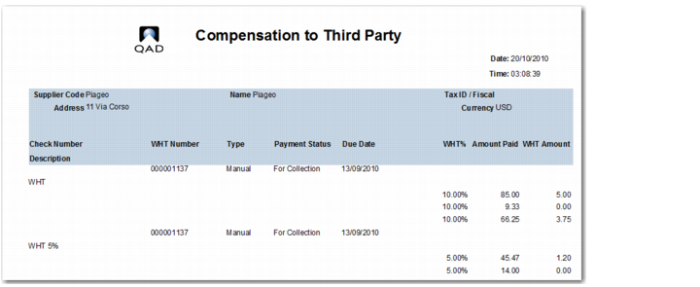
The Compensation to Third Party report lists the amounts of withholding tax due for settlement to the authorities in the selected month.
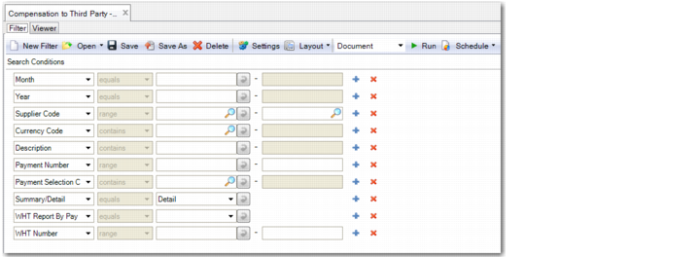
Compensation to Third Party Report, Selection Criteria
The report has the following selection criteria:
• Supplier
• Year
• Month
• Currency Code
• WHT Report by Payment
Select Yes to display payment details on the report. If you select Yes, the report displays the following information for each supplier and each withholding tax certificate format specified:
Check Number, WHT Number, Payment Type, Payment Status, WHT Date, Description, Total Amount Paid, Total WHT Amount, WHT %, Amount Paid, and WHT Amount.
The report also includes a Total by WHT Certificate Code, which excludes payments with the status Void or Bounced, and a Grand Total for the report, which sums the totals for all withholding tax certificate codes
• Certificate Format Code
Specify the certificate format code for which to run the report.
• WHT Number
Specify the range of withholding tax numbers for which to run the report.
• Payment Selection
Specify the payment selection for which to run the report.
• Payment Number
Specify the range of payment numbers for which to run the report.
• Summary/Detail
Select Summary to display totals by VAT code, certificate format code, and by supplier.
Select Details to include details of the invoices and to display totals by VAT code, certificate format code, and by supplier.
• Description
The report provides two totals:
• WHT Code Total, which is a sub-total of the withholding tax amount for each withholding code
• Withheld Total, which is the sum of all withholding tax code totals of the supplier
Compensation to Third Party, Report Summary
Compensation to Third Party, Report Detail
Withholding Tax Certificate Report
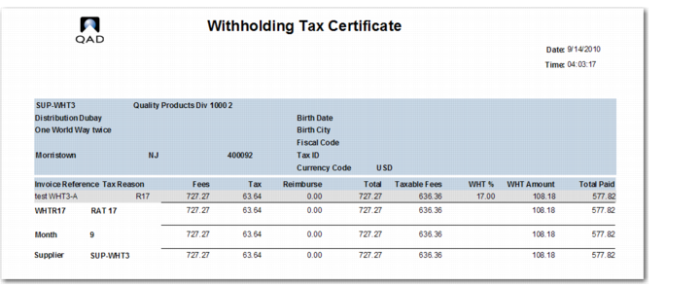
The Withholding Tax Certificate report is sent to each of the suppliers on an annual basis to certify the amount of withholding tax that has been paid to the tax authorities on the supplier’s behalf in that year.
Withholding Tax Certificate Report, Selection Criteria
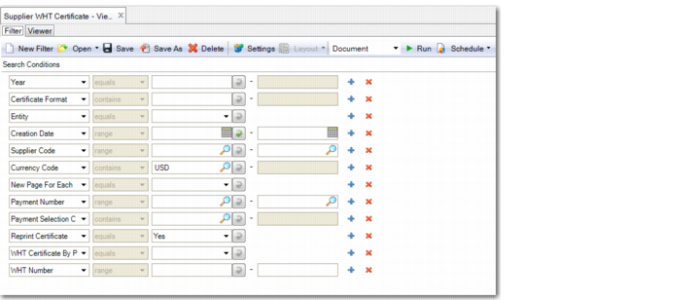
The report has the following selection criteria:
Note: Descriptions are omitted for selection criteria previously explained in the
Withholding Tax Report section.
• Supplier
• Entity
• Year
• New Page For Each Supplier
Specify Yes or No to indicate if the details for each supplier must start on a new page.
• WHT Number
Specify the range of withholding tax numbers for which to run the report.
• Reprint Certificate
Specify Yes to include certificates that were printed previously. Select No to exclude certificates that were printed previously.
• Reporting Currency
Withholding tax amounts are stored in base currency. However, this option lets you report withholding tax amounts in a currency other than your domain’s base currency.
Leave the field blank to run the report with amounts denominated in the base currency.
The following filters are hidden by default:
• WHT Certificate by Payment: Yes or No (default)
• Certificate Format
• Payment Number
• Payment Selection Code
• Creation Date
The hidden filters support certificate layouts for Thailand, where companies print a certificate for each payment rather than a summary document at the end of the year.
Withholding Tax Certificate Report