Setting Up Purchase Types
Use Purchase Type Create (28.20.3.1) to define codes for grouping supplier invoices for reporting your cash expenditures for different types of expenses. For example, use EX for miscellaneous expenses and PO for purchases of raw materials or components.
You must use at least three purchase codes—for Rents, Royalties, and Non-Employee Compensation—if you are submitting 1099 tax reports. Each of these categories is summarized into a different box on the 1099 report.
See
QAD Financials User Guide for details on setting up purchase types.
Setting Up Box Attributes
Use the 1099-MISC Box (29.6.13) activities to create, modify, view, and delete box information for 1099-MISC reporting. A 1099 box can be deleted only when no invoices exist that reference it.
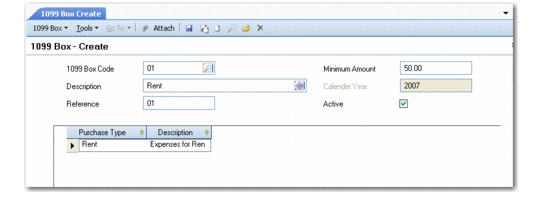
1099-MISC Box Create (29.6.3.13.1)
1099 Box Code
Specify a code (maximum 20) characters that identifies a field on the 1099 tax declaration. Often the code matches the box number on the tax form.
Description
Enter a brief (maximum 40 characters) description of this field.
Reference
Enter a number that identifies a valid 1099 reporting box. The reference associated with a code can be changed at any time, but the combination of code and box must be unique in a calendar year.
The box reference numbers are defined by the IRS, and can be changed by the IRS yearly. The boxes defined for 2006 are listed in
1099 Box Numbers.
1099 Box Numbers
Box Number | Description |
1 | Rent |
2 | Royalties |
3 | Other Income |
4 | Federal Income Tax Withheld |
5 | Fishing Boat Proceeds |
6 | Medical and Health Care Payments |
7 | Non-Employee Compensation |
8 | Substitute Payments in Lieu of Dividends or Interest |
9 | Payer Made Direct Sales of $5,000 or More |
10 | Crop Insurance Proceeds |
11 | Reserved |
12 | Reserved |
13 | Excess Golden Parachute Payments |
14 | Gross Proceeds Paid to an Attorney |
15a | Section 409A Deferrals |
15b | Section 409A Income |
16 | State Tax Withheld |
17 | State/Payer’s State Number |
18 | State Income |
This field is required. It is not validated since IRS box values can change each year. You must ensure that the box reference is correct.
Minimum Amount
Use this field to exclude amounts below the limit that you want to report. When the total payments for the purchase types linked to this box to a single supplier exceed this amount, they are included on the report; otherwise, they are skipped.
Currency
Specify the currency units in which the minimum amount is expressed.
Calendar Year
Specify the year that this code is valid. This field is required. Specifying the calendar year lets you report for past years, even when box definitions have changed. This field cannot be modified after the code is saved.
Purchase Type
This field is optional. You can link one or more types to each box. However, you cannot link a specific purchase type to more than one box.
Active
Indicate if this is an active code. An active can be referenced from other maintenance functions. An inactive record cannot be referenced when a new record is created in other functions and is not included in lookups of valid values.