QAD 2017 Enterprise Edition
>
User Guides
>
Global Tax Management
>
AvaTax
>
Validating Addresses
Validating Addresses
If you select the Explicit Address Validation field in AvaTax Configuration, you can use AvaTax to validate addresses.
If AvaTax is enabled, the Explicit Address Validation field is selected, and the country associated with the address is the US or Canada; addresses are validated when you create a new address or modify key address fields in the Business Relation, End User, and Customer Ship-To functions.
Note: No tax calculations are performed during the AvaTax address validation process.
When the record is saved, any new or modified addresses are sent to AvaTax for validation. For each new or updated address, the system calls AvaTax to check the value of the following key address fields:
• Address Line 1
• Address Line 2
• Address Line 3
• Zip Code
• City
• State
• Country Code
If AvaTax validates the new or updated address, the record saves as normal.
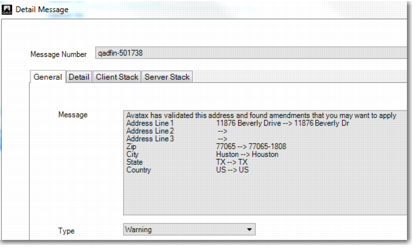
If the address is validated in part, but needs changes to be fully validated, address amendments sent by AvaTax are displayed in the form of a warning message. You must then manually implement the changes sent by AvaTax and save the address to restart the AvaTax validation. If you have implemented the changes correctly, the address is validated by AvaTax and no warning message is displayed.
Address Validation with Amendments
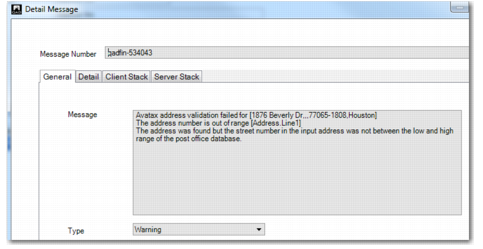
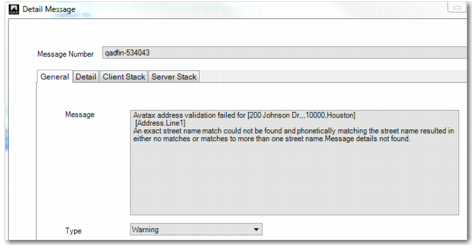
If AvaTax cannot validate the address, a warning message is displayed to indicate the reason, as shown in
Validation Failed, Incorrect Street Number and
Validation Failed, Street Name not Matched. In this case, it is recommended that you contact the third party whose address you are recording to verify their address details and then update the address record accordingly.
Note: If Avatax cannot find a valid address for a tax calculation, the system displays an error and no tax calculation is performed by Avatax.
Validation Failed, Incorrect Street Number
Validation Failed, Street Name not Matched