Delayed Tax on Supplier Invoices
Taxes on purchase orders and supplier invoices or credit notes are generally due at the same time as the invoice date. However, in some countries, taxes with certain types of suppliers only become due after the invoice has been fully or partially paid. If the Delay Until Paid Status field is selected on the entity record, the taxes only become payable when the payment status is set to Paid. In this case, allocating payment to an invoice does not generate final tax postings unless the payment status is set to Paid at the same time.
Important: Draft payments are the exception. The transfer from delayed tax to normal tax only takes place when the payment is assigned the Paid status. In addition, if the Delay Until Paid Status field is selected on the entity record, all payments are treated as drafts, and the final tax postings are only generated when the payment status is set to Paid.
When you account for tax after you have paid a supplier in AP, it is referred to as delayed tax. In this case, you can only deduct the tax in your declaration to the authorities after you have paid the supplier.
Delayed taxes are normally applied to all purchase orders and invoices for designated suppliers. You enable delayed taxes per entity. You then define a dedicated delayed tax rate and apply a tax environment that retrieves this rate for the supplier. This ensures that purchase orders and invoices for this supplier are automatically subjected to delayed tax. You can also apply normal taxes when creating individual purchase orders and supplier invoices by selecting a tax environment that retrieves a normal tax rate.
Note: You delay taxes on AP payments only. Use the Suspended Taxes option to defer taxes on AR payments. For more information on AR invoices and payments, see
QAD Financials User Guide.
For delayed tax, you use Tax Rate Maintenance (29.4.1) to define a set of tax accounts for the delayed tax rate. The system then uses these accounts in postings when the delayed tax rate is applied.
When you allocate payment to a supplier invoice with delayed tax, the system transfers the delayed tax amount to normal tax, and generates a second tax posting. This posting credits the AP Invoice Delayed Tax account for the tax amount, and debits the normal tax account. The tax point date and period for both postings is the same as the payment tax point date. The normal AP tax will, therefore, appear in the reporting for the period in which the payment was made.
Delayed Tax on Other Supplier Payments
In addition to Supplier Invoice Create, the following functions generate delayed tax postings (or reversal of delayed tax in case of payment) if delayed tax applies for the supplier:
• Supplier Payment Create—for payments that are not initial and for payments other than drafts
• Supplier Payment Selection Confirm—for payments other than drafts
• Banking Entry and Cashbox Entry, when the payment is allocated to a supplier invoice or to a supplier payment of type Draft
• When the payment is allocated to a supplier invoice
• When you change a Supplier Payment Status to Paid for a payment instrument of type Draft
• When processing an incoming bank file, when the status of the payment is changed to Paid or for a payment instrument of type Draft
• Open Item Adjustment, when you close a supplier open item and its balance is netted to zero
A partial open item adjustment does not cause the transfer from delayed to normal tax.
Delayed Taxes and Reversed Payments
If you reverse a payment to a supplier by setting it to Void, Bounced, or Initial or if you re-open the invoice in Open Item adjustment, the delayed tax transaction is netted from the normal AP tax account and re-posted to the AP delayed tax account.
Calculating Delayed Tax Points
When you pay a supplier in payment stages, you can define the point at which delayed taxes are calculated. The tax points for delayed tax on staged payments are defined using the same method as for suspended tax.
Setting Up Delayed Tax
Delayed tax for payments to suppliers is set up using the same method as for suspended tax on customer payments.
Delayed Tax and Receiver Matching
Delayed tax does not accrue when the items are received. Therefore, in receiver matching, the PO receipt amount without delayed tax is matched to the base amount of the supplier invoice.
Example:
You create a purchase order for 80 USD of items order from a supplier. A delayed tax rate of 17% applies. The items are to be delivered to the site where you recorded the order.
Receipt Postings
When the items are recorded as received, the system posts the following journal entries to the PO Receipts daybook. Delayed tax does not accrue at receipt so the postings are for the cumulative costs for the items ordered.
Invoice Postings
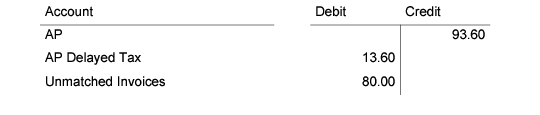
When you receive an invoice from the supplier and record the details using Supplier Invoice Create, the delayed tax is applied to the base invoice amount. When the invoice is saved, the delayed tax is posted to the AP Delayed Tax account specified for the applicable delayed tax rate in Tax Rate Maintenance. The journal entries for the supplier invoice are:
Matching Postings
You then match the supplier invoice to the PO receipt for the items in Receiver Matching Create. Delayed tax did not accrue when the items were received so the PO receipt without tax is matched to the base amount of the supplier invoice. The receiver matching postings are:
Supplier Payment Postings
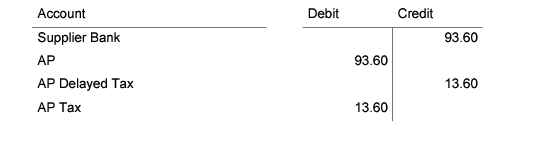
When the invoice has been paid, you create a supplier payment and allocate it to the invoice to process the invoice amount. The system then generates a second tax posting if the Delay Until Paid Status field is deselected on the entity record. If the Delay Until Paid status field is selected, allocating a payment to an invoice does not generate final tax postings unless the payment status is also set to Paid.
When you save the supplier payment, the system nets the tax from the delayed tax account and posts it to the normal account used for AP taxes.