Paying Invoices Subject to Withholding Tax
When you pay an invoice that is subject to withholding tax, the withholding tax amount is subtracted from the amount paid to the supplier, and this amount is credited to the withholding tax account.
Multiple withholding tax entries can exist for each invoice, and you can make partial payments against each invoice. If you partially pay an invoice, the system calculates the withholding tax liability by prorating it against the total payment due for that invoice.
The standard payment functions support withholding tax:
• Supplier Payment Create
• Supplier Payment Selection Create and Supplier Payment Selection Confirm
• Banking Entry Create, Banking Entry Allocate, Petty Cash Create, and Petty Cash Allocate
• Open Item Adjustment
The system creates a withholding tax record when a payment is created with any status other than Initial, and deducts the withholding tax amount for the amount to allocate and reduces the Paid Amount by this value. However, the withholding tax liability remains outstanding until the payment is set to the Paid status.
Note: An invoice is marked as closed when the full amount, after withholding tax, is paid, and the payment is set to the Paid status.
When you save a supplier payment for an invoice with withholding tax with a status of Paid, a withholding tax record is created for the payment and the withholding tax date is set to the payment creation date. The system then generates a withholding tax number for the payment. For cross-company transactions, the withholding tax record is created in the entity where the invoice was created.
When the invoice is paid, the system creates additional general ledger postings to the withholding tax account defined for the withholding tax rate. For example, if the invoice amount to pay is 100, and the withholding tax deduction is 10, the postings are as follows:
|
GL Account
|
DR
|
CR
|
|
Supplier Control Account
|
100
|
|
|
Bank Account
|
|
90
|
|
Withholding Tax Account
|
|
10
|
Note: The transactions shown are a summary of several postings created, and indicate the net result of the transactions. See
Withholding Tax Examples for detailed transaction line examples.
If you want to modify the withholding tax details on the supplier payment line, you must select the Update Tax Allowed field in Tax Rate Maintenance for the tax rate and tax code. If any of the withholding tax codes linked to the invoice have a tax rate for which the Update Tax Allowed field is cleared in Tax Rate Maintenance, you cannot modify any of the withholding tax payment amounts for that invoice.
Supplier Payment Create
If withholding tax is enabled for the domain and for the supplier, withholding tax values are calculated for invoices. You can then use Supplier Payment Create to pay invoices subject to withholding tax.
When paying an invoice with withholding tax, you specify the supplier and then specify the invoice amount less withholding tax in the Amount field in Supplier Payment Create. If an invoice for 1000 Euros is subject to 114.20 Euros withholding tax, enter 885.80 Euros in the Amount field in Supplier Payment Create.
Note: You can also leave the Amount field as zero in Supplier Payment Create, and continue to the Allocate screen. The system calculates the amount to pay and copies this value back to the Amount field in Supplier Payment Create.
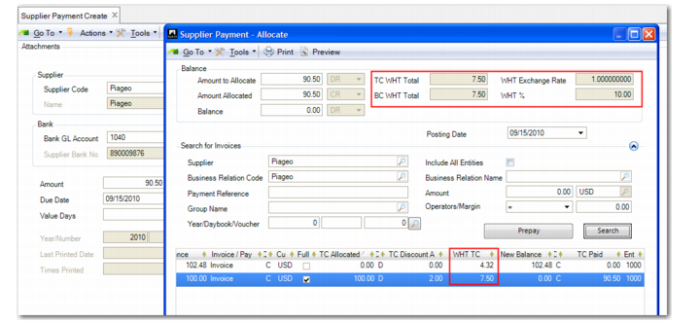
Click the Allocate button and locate the invoice subject to withholding tax. Select the Full field to allocate the full payment amount to the invoice. When you click the Full field, the system deducts the withholding tax value and discount applicable from the outstanding invoice amount, and updates the TC Paid field in the grid in Supplier Invoice Allocate to be the open invoice amount less withholding tax and the discount.
If you allocate partial payment to the invoice, the withholding tax is proportional to the payment amount against the invoice. For example, if an invoice for 1000 is subject to 150 Euros withholding tax, 850 Euros is due in payment. If you allocate a partial payment of 425 Euros to the invoice, the withholding tax for the partial payment is calculated as 75 Euros. For a partial payment, the withholding tax is proportional to the payment amount against the invoice.
The withholding tax amount is modifiable and the input amount cannot exceed the withholding tax amount calculated for the invoice. An exception to this occurs if rounding differences apply. However, in this case, the difference between the input amount and the calculated amount cannot exceed one decimal of the calculated amount. For example, for two decimals, if the calculated amount is 6.33, the maximum input amount is 6.40.
Supplier Payment Create and Supplier Payment Allocate
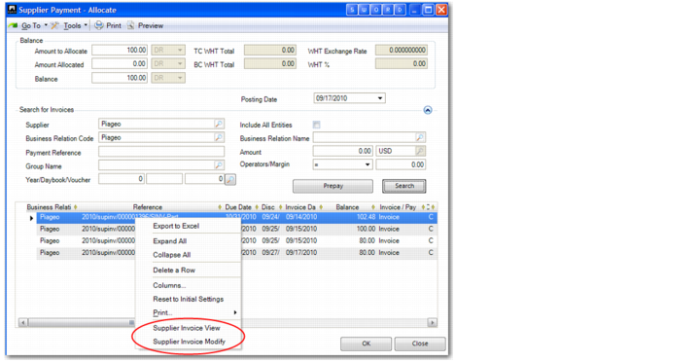
When allocating a supplier payment, you can drill down from the invoice line in the grid to Supplier Invoice Modify and Supplier Invoice View, which let you modify or view the invoice. This facility lets you create and edit withholding tax details at the moment of payment.
Supplier Payment Allocate, Drill-Down
The following are the key withholding tax fields in Supplier Payment Allocate:
TC WHT Total
This field displays the total withholding tax amount in the transaction currency, and is read only.
The withholding tax amount is automatically calculated based on withholding tax data within the invoice.
WHT Exchange Rate
This field displays the withholding tax exchange rate, and is read only.
If the payment is in foreign currency, the withholding tax exchange rate defaults to the Tax exchange rate applied. If a Tax exchange rate does not exist, the system reverts to using the accounting exchange rate, providing that Fallback to Accounting is enabled for the Tax exchange rate type. If neither rate is available, an error is displayed.
Similarly, the system converts amounts from the transaction currency to the statutory currency using the Tax exchange rate that is valid on the posting date of the payment. If the Tax exchange rate does not exist, the system searches for the statutory exchange rate between the currencies. If the statutory exchange rate does not exist, the system reverts to using the accounting exchange rate for that date, providing that Fallback to Accounting is enabled for the statutory exchange rate type. If the system cannot find an accounting exchange rate, an error is displayed.
If a payment that was not created directly in the Paid status is subsequently updated to Paid, the system recalculates the base currency and statutory currency withholding tax amounts using the rates that apply on the date the payment was set to Paid. The withholding tax records for the payments are then updated accordingly.
Note: The Tax exchange rate type (previously called the VAT exchange rate type) is system-defined. You define exchange rates for the Tax exchange rate type using the Exchange Rate Create function. See
QAD Financials User Guide. for more information.
BC WHT Total
This field displays the total withholding tax amount in the base currency, and is read only.
WHT %
This field displays the withholding tax percentage, and is read only.
This is the calculated average of the withholding tax total over the total withholding tax base amount of the payment.
If the withholding tax total is updated due to a change in the withholding tax amount for the invoice, the system recalculates the withholding tax percentage accordingly.
The recalculation of the withholding tax percentage occurs whether you manually update the withholding tax amount for the invoice using Supplier Payment Allocate, or you use a drill down to the supplier invoice and update the withholding tax total there, before returning to the payment function.
Grid
WHT TC
If Update Tax Allowed is selected in Tax Rate Maintenance for all tax codes on the invoice, you can use this field to manually update the withholding tax amount for the invoice. If you manually change the withholding tax amount, the withholding tax percentage is automatically recalculated.
Supplier Payment Selection
If withholding tax is enabled for the domain, you can use Supplier Payment Selection Create to create payments for invoices subject to withholding tax.
When you include a supplier invoice that is subject to withholding tax in a payment selection, the system calculates the withholding tax and reduces the payment by the value of the withholding tax. The same calculations for partial payments apply, as described in
Supplier Payment Create.
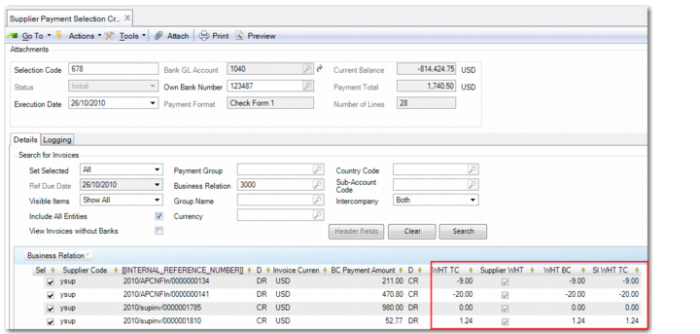
Within selecting a supplier invoice for payment in Supplier Payment Selection, you can also drill down from the invoice line in the grid to Supplier Invoice Modify and Supplier Invoice View, which let you modify or view the invoice.
Supplier Payment Selection Create, Withholding Tax Fields
Note: All withholding taxes defined on a supplier invoice are always allocated against the first bank account defined on the supplier invoice.
When you use Supplier Payment Selection Confirm to confirm a payment selection that includes invoices subject to withholding tax, withholding tax records are created and the withholding tax number is generated based on the numbering system defined in Record Number Maintain.
Bounced Supplier Payments
If a supplier payment that is subject to withholding tax is bounced or reset to the Initial status, the system sets the status of the withholding tax liability record to Void.
You can bounce supplier payments using the following functions:
• Supplier Payment Modify
• Supplier Payment Change Numbers
• Supplier Payment Mass Change
• Supplier Payment Selection Unconfirm
• Banking Entry–Allocate to Payment
You can set a supplier payment to Initial in the following functions:
• Supplier Payment Modify
• Supplier Payment Modify to Initial
• Supplier Payment Change Numbers
• Supplier Payment Mass Change
If a supplier payment is voided, the system creates a new payment linked to the same invoices. In this case, the system updates the supplier payment reference information in the withholding tax records.
The system debits the Supplier Payment account and credits the Supplier Control account. Any withholding tax records associated with the payments are set to Void, and are no longer included in any of the withholding tax reports.
Banking Entry and Petty Cash
You can allocate a banking entry or petty cash entry directly to an invoice subject to withholding tax. In this case, the payment is set to Paid, a withholding tax record with status Due is created, and the related withholding tax liability is posted.
You can also use banking entry to indicate that a For Collection payment subject to withholding tax has been cleared from the company’s bank account. You allocate the banking entry to the supplier payment subject to withholding tax.
Open Item Adjustment
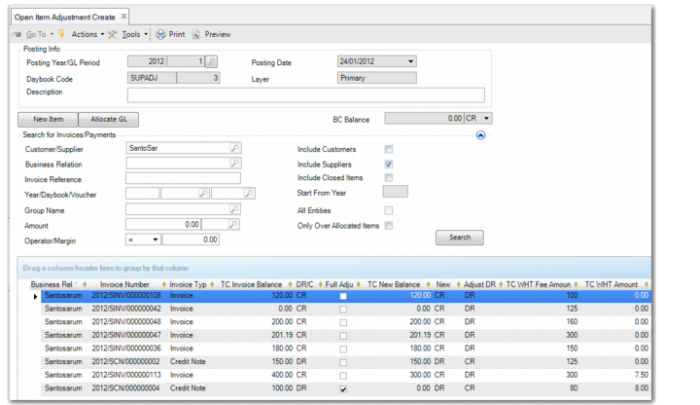
In Open Item Adjustment Create, when you adjust an open item subject to withholding tax, the movement is considered a payment. This means that the system creates a withholding record with the status Due and the withholding tax liability is posted.
Open Item Adjustment Create
In Supplier Invoice Create, you can also adjust open items subject to withholding tax by linking an existing open item, such as a credit note, to a newly created open item. However, you cannot manually enter the withholding tax amount for adjustments of this type so both open items must be subject to withholding tax and subject to the same overall withholding tax rate (percentage).
If you adjust open items subject to withholding tax, the withholding tax due is proportional to the adjustment amount against the invoice, as illustrated using the following example.
Example:
In Open Item Adjustment, a credit note for 100 Euros is fully netted against a supplier invoice for 400 Euros for the same supplier. Both items are subject to withholding tax.
Item Type | Open Balance | WHT for Open Balance | Full Adjustment? | New Balance | WHT Due |
Invoice | 400 | 30 | No | 300 | 7.50 |
Credit Note | 100 | 8 | Yes | 0 | 8.00 |
When the credit note is adjusted against the invoice, the credit note status is set to Paid and the withholding tax of 8 Euros becomes due. The new balance of the open invoice is 300 Euros. The amount of withholding tax due on the partially settled invoice is the adjusted amount divided by the original open balance:
100/400 = 0.25
The full withholding tax amount for the pre-adjustment open balance is multiplied by 0.25:
30 * 0.25 = 7.50
As a result of the adjustment, 7.50 Euros from the original 30 Euros withholding tax for the invoice is now due. Withholding tax of 22.50 Euros applies for the 300 Euros outstanding invoice balance.
Credit Notes and Corrections
When you create a taxable supplier credit note for a supplier for whom withholding tax applies, the system defaults the withholding code defined for the supplier and domain in the Supplier record or populates the data automatically using GTM. The system then sets the value of the TC Fees Amount (DR) to the taxable base amount of the invoice.
If you then create a supplier payment with the Paid status that includes the credit note, as well as other invoices, the value of the payment for the invoices is reduced by the calculated value of the withholding tax, but increased by the withholding tax that applies to the credit note.
Item Type | Open Balance | Full Payment? | WHT Due |
Invoice | 400 | Yes | 30 Cr |
Credit Note | 100 | Yes | 8 Dr |
Invoice | 120 | Yes | 10 Cr |
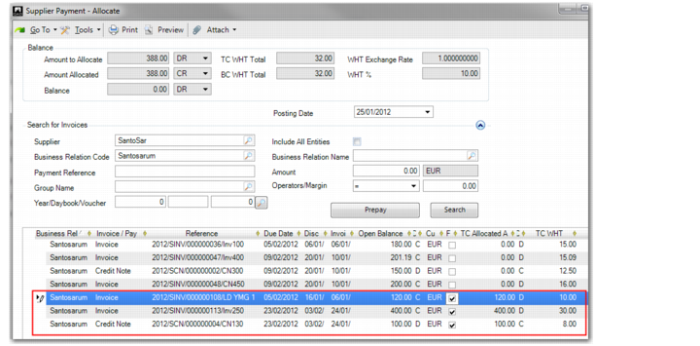
In the case of the two invoices and the credit note listed in the table and shown in
Supplier Payment–Allocate, the total payment amount is 388 Euros. This amount is calculated as follows:
(invoice payments – credit note) – withholding tax on invoices + withholding tax for credit note
(520 - 100) – 40 + 8 = 388
Supplier Payment–Allocate
When you save the payment (with the Paid status), the system creates a GL posting that credits the bank account for the full value of the payment, excluding the withholding tax amounts on the invoices and the credit note, and debits the Accounts Payable account for the full value of the invoices and credit notes. The system also credits the Withholding Tax Liability account for the withholding tax associated with the invoices, and debits the Withholding Tax Liability account for the value of the withholding tax that applies for the credit note.
The system creates withholding tax records for each invoice and credit note associated with the payment for which withholding tax applies. For the invoices, the fee amounts use the credit fields in the withholding tax record, and for the credit note, the debit fields are used.