Item Attribute Control
In Item Attribute Control, you can define control parameters that determine the default values for fields associated with item attribute or QAD EE programs. You can:
• Set up the default status for a new attribute when it is added to an attribute profile.
• Set the default inventory status code to be used for processing a non-conforming item lot.
• Determine if the specifications for lot and sublot profile attributes are displayed when using receipt transaction.
• Determine if the inventory detail Reference field identifies a sublot.
• Set the Number Range Management (NRM) sequence code for lot attribute order IDs, automatically assigned lot numbers, and item attribute IDs.
Follow these steps to set up item attribute controls:
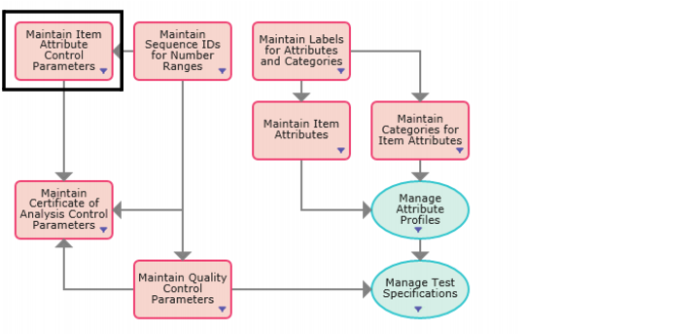
1 Open Item Attribute Control by selecting Maintain Item Attribute Control Parameters from the Manage Enterprise Item Attributes process map.
Manage Enterprise Item Attribute Process Map
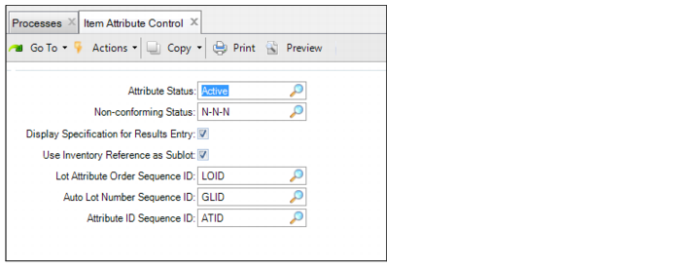
2 Enter the required information in the following fields:
Item Attribute Control
Attribute Status
Set the default status to Active or Inactive. It is recommended that you set the default status to Active, which is the default status for a new attribute when it is added to an attribute profile. For more information about attribute status, see
Adding Attributes to an Item Profile.
Non-conforming Status
Select the inventory status code that is applied to an inventory lot when the result for that lot on a quality or lot attribute order is non-conforming. The inventory status code is applied when you close the quality or lot attribute order for that inventory lot. For more information about inventory status codes, see the
QAD Master Data User Guide.
Display Specification for Results Entry
Select this check box to have the system display the profile specifications for lot and sublot attributes when entering values for those attributes using supported receipt transactions.
Use Inventory Reference as Sublot
Select this check box to have the inventory detail Reference field identify the sublot for an inventory lot record. This check box should only be selected if:
• The Reference field for inventory records will never be used to identify a location such as a shelf, a bin, a pallet, or a container.
and,
• There is no integration with QAD Warehousing.
Note: If you are using QAD Warehousing, do not select this check box because Warehousing uses the Reference field for pallets.
Lot Attribute Order Sequence ID.
Enter the Number Range Management (NRM) sequence used to automatically assign the ID for lot attribute orders. The system uses this code to generate sequence numbers for all lot attribute order numbers. When setting up the sequence in NRM, use ql_id as the target dataset. For information on setting up NRM sequences, see the
QAD System Administration User Guide.
Auto Lot Number Sequence ID.
Enter the NRM sequence code that the system can use when processing a PO Shipper Receipt to automatically assign lot numbers for inventory. This sequence code is used when auto lot numbering has not been set up using Lot Group Maintenance in the Regulatory Attributes module and the lot number that is specified on the PO shipper already exists in inventory. When setting up the sequence in NRM, use attrlot_lot as the target dataset. For information on setting up NRM sequences,
QAD System Administration User Guide.
Attribute ID Sequence ID.
Enter the NRM sequence code used to automatically assign the attribute ID for an item attribute. When setting up the sequence in NRM, use attr_name as the target dataset. For information on setting up NRM sequences, see the
QAD System Administration User Guide.