Attribute Deviations - Inventory
For inventory, use profiles that do not specify a site to define deviations for a specific item and inventory site.
Maintain Item Profile
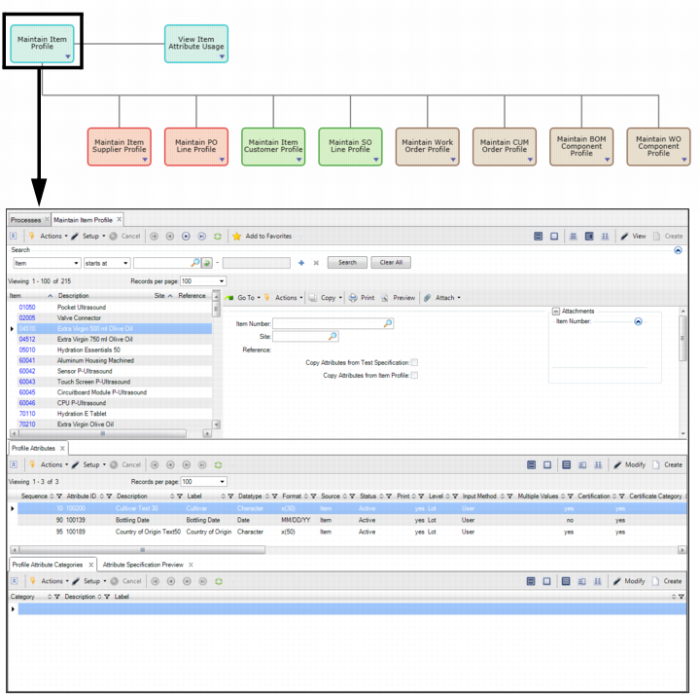
In the Maintain Item Profile collection, you can create item profiles that allow you to track different attributes when dealing with a certain items.
To access the item profile collection, select Maintain Item Profile from the Manage Attribute Profile process map.
Manage Attribute Profiles
Creating a Deviation - Item Profile with Site
To create an item profile and to specify that it applies to a specific site, see
Creating an Item Attribute Profile.
Attribute Layer Priority - Inventory
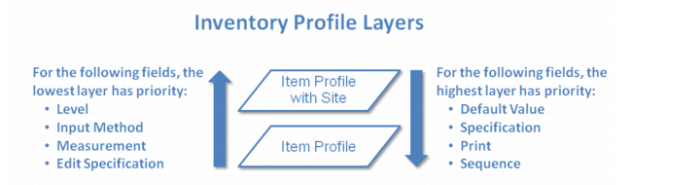
When there are multiple item profiles that specify and do not specify a site, some profiles will override other profiles. Each profile uses a different set of layers and priorities, which control how profile attributes override one another. The following graphic outlines the attribute layer priority for inventory profiles:
Attribute Layer Priority - Inventory
The sub-layers determine how different entries within a layer override one another. The sub-layers will not, however, allow a layer to override a higher layer.
• Item Profile
• Item and Site
• Item
Field priority functions in both directions, depending on the field. In the case of Default Value, Specification, Print, and Sequence, the highest layer has priority. The field value of the highest layer cascades down.
For the Level, Input Method, UM, and Edit Specification fields, the lowest layer has priority. The field value of the lowest layer cascades up.