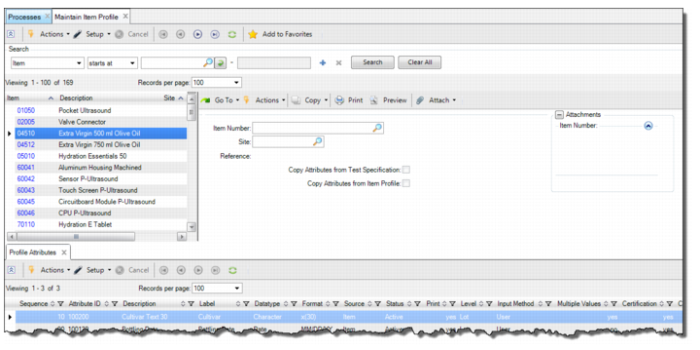
Creating an Item Attribute Profile
Follow these steps to create an item attribute profile:
1 Open Maintain Item Profile by selecting Maintain Item Profile from the Manage Item Profiles process map.
2 To create an item profile, click Create in the top-level browse.
3 Enter the required information in the following fields:
Creating an Item Attribute Profile
Item Number
Select or enter the item number for the attribute profile.
Site
Leave this field blank when first creating a set of attributes for an item. When the Site field is blank, the attributes defined for the item apply to the item, across all sites for the domain. You should only specify a site when defining a deviation for an attribute specification for an item at a site.
Reference
Enter any reference information in this field, such as a reference document for the item and its attribute profile.
Copy Attributes from Test Specification
Select this check box to copy the attributes from a test specification to the item. If an attribute exists in the item profile, the system proceeds to the next attribute. The copied attributes are added after the last one in the target profile.
Copy Attributes from Item Profile
Select this check box to copy the attributes from another item profile to an item. If an attribute exists in the item profile, the system proceeds to the next attribute. The copied attributes are added after the last one in the target profile.
Test ID
Select or enter the test ID to copy the attributes from.
Revision
Select or enter the revision level of the test ID to copy the attributes from.
Item
Select or enter the item number to copy the attributes from.
Site
Displays the site for the item profile that is selected in the Item field. Typically the value for site is left blank.