Monitor Materials for Sales
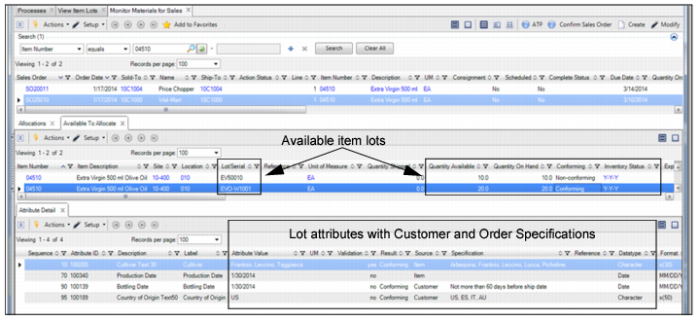
The Monitor Materials for Sales collection provides a thorough view of materials for orders. Use this collection to:
• Monitor if available and allocated inventory conforms to customer specifications.
• Drill down and determine why a lot is non-conforming.
• Plan shipping allocations.
When you select a sales order line in the top-level browse, the Allocation, Available to Allocate, and Attribute Details tabs display the following information:
• Allocations tab. Displays the current allocations for the item on the selected SO line.
• Available to Allocate tab. Displays if any there are any available item lots to allocate for the item on the selected SO line.
• Attribute Detail tab. Displays the attributes associated with the selected item.
Monitor Materials for Sales
The system presents attributes for a customer order line item.
You determine the attributes, specifications, and parameters for a customer order line item.
Sales Order Manual Allocations
For manually allocating (pick) quantities for a customer order or shipper, the system determines the attribute specification using the following sequence:
1 From the order specification for the attribute if it exists
2 From the item, customer, and site specification for the attribute if it exists
3 From the item and site specification for the attribute
The system displays the attribute values for item lots that conform and do not conform to the order line specifications.
Pre-Shippers/Shippers
When confirming the pre-shipper or shipper, the system validates the current inventory quantity with the pre-shipper or shipper quantities, then creates transaction history and certification records for attributes.
When creating the shippers, you select and allocate an inventory quantity for the order line. The system validates the allocation quantity using the attribute values and the attribute specifications for the item and order line. It then creates pre-shipper or shipper records for qualified inventory quantities.
Shipping
The system qualifies and determines the default inventory quantities to issue using quantities that have been detail allocated or picked, the attribute specifications for each item, and the attribute values for the inventory quantities to ship.
When considering the attribute specification from the order specification for attributes, the system first considers the customer order line specification for the attribute if it exists, then the item and customer specification for the attribute if it exists, then the item specification for the attribute.
The system processes shipments and returns of quantities to customers, capturing and validating attribute values with specifications for the order line and/or item. During shipping processing, the system lets you view the inventory quantities that are selected to ship for an order line, and the attribute values and specifications for quantities to ship.