Collections for WIP Test Records
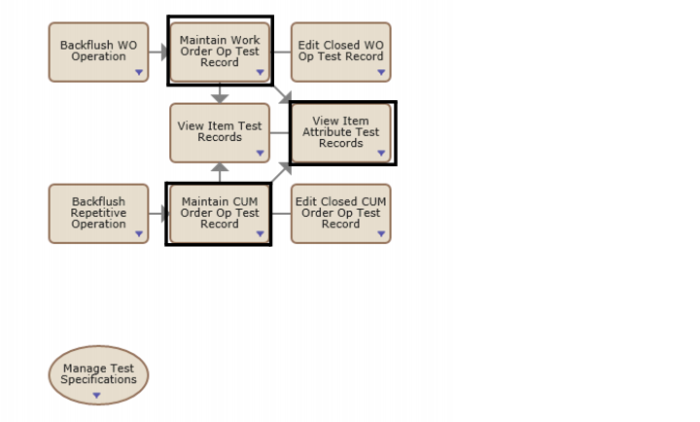
The Inspect Production Operation process map contains functions that deal specifically with the inspection of test records for WIP operations:
Inspection Production Operation is located in Home|Manage Enterprise Item Attributes|Manage Production with Attributes|Inspect Production Operation.
Process Map - Inspect Production Operation
Maintain Work Order Op Test Record Collection
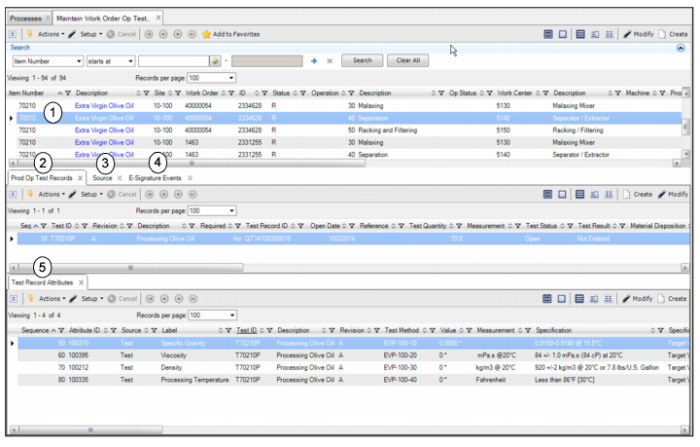
For WIP operations, the Maintain Work Order Op Test Record collection allows you to manage and maintain test records that are directly associated with a work order and operation. This collection also allows you to confirm information for the work order and operation and to browse, select, update, and review test record attribute values and results.
Maintain Work Order Op Test Record Collection
The Maintain Work Order Op Test Record collection consists of the following:
1 WO Operation Test Record. Displays the work order operation.
2 Prod Op Test Records tab. Displays the test records associated with the selected work order operation.
3 Source. Displays additional information for the selected work order operation.
4 E-Signature Events tab. Displays the e-signature records created for the selected test record. If e-signature functionality is enabled, when you change the status of a test record to Approve Pending, Closed, or Canceled, the system prompts for an e-signature. The system processes data to record the event and displays the information on the E-Signature Events tab. Double-click the record to view e-signature event details.
For information about setting up e-signature functionality, see
QAD Security and Controls User Guide.
5 Test Record Attribute tab. Displays the attributes associated with the selected test record.
Maintain CUM Order Op Test Record Collection
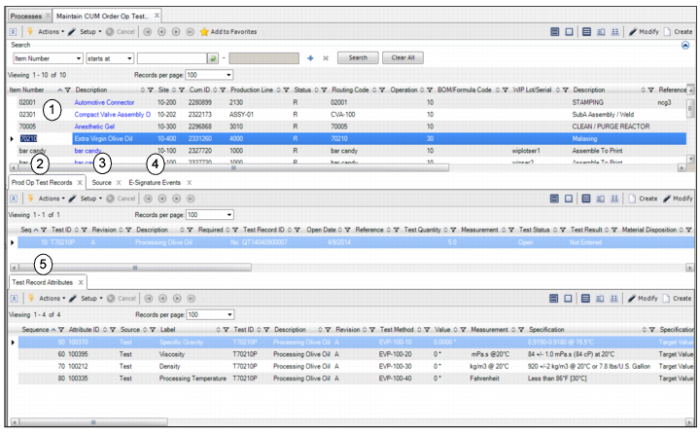
The Maintain CUM Order Op Test Record collection allows you to manage and maintain test records that are directly associated with an Advanced Repetitive CUM order and operation. This collection also allows you to confirm information for the CUM order and operation and to browse, select, update, and review test record attribute values and results.
Maintain CUM Order Op Test Record Collection
The Maintain CUM Order Op Test Record collection consists of the following:
1 CUM Order Operation Test Record. Displays the CUM order operation.
2 Prod Op Test Records tab. Displays the test records associated with the selected work order operation.
3 Source. Displays additional information for the selected work order operation.
4 E-Signature Events tab. Displays the e-signature records created for the selected test record. If e-signature functionality is enabled, when you change the status of a test record to Approve Pending, Closed, or Canceled, the system prompts for an e-signature. The system processes data to record the event and displays the information on the E-Signature Events tab. Double-click the record to view e-signature event details.
For information about setting up e-signature functionality, see
QAD Security and Controls User Guide.
5 Test Record Attribute tab. Displays the attributes associated with the selected test record.