QAD 2017 Enterprise Edition > User Guides > Intrastat > Intrastat Process > Collecting Intrastat Data
  
Collecting Intrastat Data
Intrastat data can be collected in the functions listed in Functions Supporting Intrastat.
 

Functions Supporting Intrastat
 
Menu Number
Description
Program Name
3.4.1
Transfer–Single Item
iclotr02.p
3.4.2
Transfer–Multi Item
iclotr01.p
3.4.3
Transfer with Lot/Serial Change
iclotr03.p
3.4.4
Batchload Transfer with Lot/Serial Change
iclotr04.p
5.3.1
Blanket Order Maintenance
poblmt.p
5.5.1.13
Supplier Scheduled Order Maintenance
rspomt.p
5.7
Purchase Order Maintenance
popomt.p
7.1.1
Sales Order Maintenance
sosomt.p
7.3.13
Customer Scheduled Order Maintenance
rcsomt.p
7.13.1
Pending Invoice Maintenance
soivmt.p
11.7.1.1
RMA Maintenance
fsrmamt.p
11.7.3.1
RTS Maintenance
fsrtvmt.p
11.11.1
Material Order Maintenance
fseomt.p
12.17.13
Distribution Order Workbench
dsdomt01.p
12.17.14
Distribution Order Maintenance
dsdomt.p
12.17.21
Distribution Order Processing
dsdomt02.p
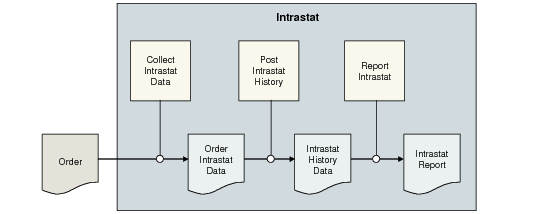
Data is collected and held in a staging table where it can be modified if necessary. It is then posted to a history table in preparation for reporting. Posting to history occurs automatically for functions such as sales and purchases during shipment or receipt.
The Intrastat data in distribution orders follows similar logic as that used for sales orders, except that the two sides of the transfer are posted separately, since they affect different declarants:
Intrastat data is created at creation of the distribution order.
The export data is posted at goods issue.
The import data is posted at distribution receipt.
However, for inventory transfers, you must manually post the records to history since transfers do not involve a two-step process in the same way as purchases and sales.
This flow of data is shown Flow of Intrastat Data.

Flow of Intrastat Data