Printing Intrastat Declarations
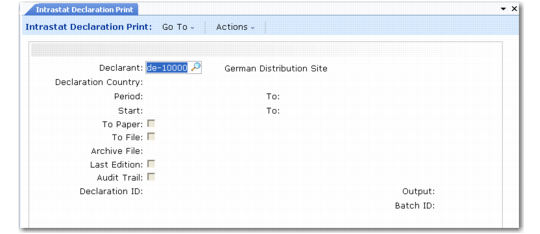
Use Intrastat Declaration Print (29.22.19) to make Intrastat declarations. Begin by entering the declarant and the period to be covered by this declaration. You can choose if you want to print Intrastat reports for verification first by setting Last Edition to No. Set Last Edition to Yes before printing the final report. You can have additional audit information printed.
Note: Use Intrastat Declaration Reprint (29.22.20) to print Intrastat information that has previously been printed with Last Edition set to Yes.
The supported output types are determined by the country-specific Intrastat driver program associated with the declarant. See
Available Intrastat Report Programs.
When output to file is supported, the default file name and format is also determined by the driver program. When alternate print formats are supported, a pop-up prompts for the format to use. For example, in Belgium, the format can be ITX or SDF.
Other country-specific features are also supported in this report based on the report driver program. Additional pop-ups may display for input of required information such as change of activity and declaration number (Italy).
When making an electronic declaration, if Last Edition is set to No, you can still print a paper copy of the report for your records by setting Audit to Yes. This produces a paper report of the data in a generic format.
Intrastat Declaration Print (29.22.19)
Declarant
Enter the Intrastat declarant for which the report is produced. The system displays the entity and country associated with the declarant. This field defaults from the declarant specified in Intrastat Control.
Period/To
Specify the GL period range for this report, in the format from month/year to month/year. The system displays the actual start and end date for the periods.
Arrivals, Dispatches
Specify whether the report contains arrival transactions, dispatch transactions, or both.
Note: Use of these fields is based on the country of the declarant. In most cases, both fields are set to Yes and you cannot update them. However, local regulations sometimes require transactions to be separated. In such cases, the fields can be updated.
To Paper
Enter Yes to print the report on paper; otherwise, enter No.
To File
Enter Yes to print the report to a file. You can print a report to file and on paper at the same time if the associated report driver program supports this feature.
Declaration Number
Enter the declaration number to print on the report. This must be entered for Italy.
Change of Activity
For Italian reports, specify whether the company discontinued trading at any point or whether the VAT status of the company has changed during the year. This code is typically required when a company ceased trading for any reason.
0: No change
1: A change occurred during the year
File Name
Specify the output file name if the report is being sent to a file. The default name is set by the driver program that is generating the report and is country specific. You can change the file name if needed.
Last Edition
Indicate whether this is the last edition (final version) of this report.
No: Subsequent reports will be printed.
Yes: This is the final version. All transactions included in the report are designated as reported and will be excluded from the next Intrastat report.
When Audit is Yes, you cannot set this field to Yes.
Audit Trail
Indicate whether to create an audit trail.
No: Print the report without an audit trail.
Yes: Print an audit trail showing additional information such as Intrastat number and references.
You cannot set this field to Yes if the Last Edition field is also set to Yes.
Transmission Type
For declarants located in the United Kingdom, indicate if the file produced has live data. Normally this is set to Live. Specify Test to produce a test file for submission to UK Customs and Excise to validate that your Intrastat file has been produced in the correct format.
Media
For declarants located in the United Kingdom, specify the format of PC-media used to deliver Intrastat data to UK Customs and Excise. Valid entries are:
• DISK
• E-MAIL
• TAPE