Set Up Declarants
Use Declarant Maintenance (29.22.1.20) to specify the company addresses responsible for Intrastat reporting to the government. This is a company address for which transactions are reported for a country and a number of entities.
Set up the business relation for the declarant before creating the company address. Address and tax details are found on the business relation, including the VAT registration number. The declarant region is taken from Declarant Maintenance.
Associate a declarant with each site (and its associated entity) using Site Maintenance (1.1.13). Intrastat information is reported by the declarant associated with the site that is shipping or receiving goods. An agent such as a transporter can optionally perform the declaration for the declarant.
The system includes several programs that format the reports for Intrastat movements. These programs create Intrastat reports for a particular declarant and control the layout of the report. Specify the name of the program used for an individual declarant in the Program field. Available report programs are shown in
Available Intrastat Report Programs.
Available Intrastat Report Programs
|
Program Name
|
Country
|
Output Options
|
|
iehxx01.p
|
Generic
|
Paper only
|
|
iehat01.p
|
Austria
|
Paper, flat ASCII file, EDI
|
|
iehbe01.p
|
Belgium
|
XML file
|
|
iehbf01.p
|
Belgium in French
|
Paper or flat ASCII file
|
|
iehbn01.p
|
Belgium in Dutch
|
Paper or flat ASCII file
|
|
iehdk01.p
|
Denmark
|
Paper or flat ASCII file
|
|
iehfr01.p
|
France
|
Paper or flat ASCII file
|
|
iehge01.p
|
Germany
|
Paper or flat ASCII file
|
|
iehit01.p
|
Italy
|
ASCII file only
|
|
iehlu01.p
|
Luxembourg
|
Paper, flat ASCII file, EDI
|
|
iehnl01.p
|
The Netherlands
|
Paper or flat ASCII file
|
|
iehpl01.p
|
Poland
|
Paper or XML file
|
|
iehsp01.p
|
Spain
|
Paper only
|
|
iehuk02.p
|
The United Kingdom
|
EDI format
|
Some declarant fields are country-specific. For example, Declaration Region and Affiliation are used for declarants in Germany. An additional validation code must be entered for declarants in Austria. Company ID Number applies only to declarants in Poland.
Display defined declarants with Declarant Browse (29.22.1.21).
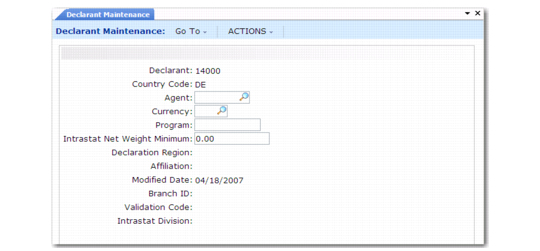
Declarant Maintenance (29.22.1.20) illustrates Declarant Maintenance.
Declarant Maintenance (29.22.1.20)
Declarant
Enter a code identifying the company address of the declarant for which transactions are reported. This address must already exist in Company Address Maintenance (2.12). Address and tax details come from the associated business relation.
Country
Specify a valid, active code identifying the country for which you declare Intrastat. This country must be defined as a member of the European Union.
Agent
If an agent (third party) is making the declaration on your behalf, enter the company address code identifying that agent.
Currency
Specify the currency of the report.
Program
Enter the Intrastat report driver program used to produce reports for this Intrastat declarant. See
Available Intrastat Report Programs.
Intrastat Net Weight Minimum
Enter the minimum weight for each reported consolidated line. All weight figures less than this minimum are rounded to this weight for Intrastat reports.
The unit of measure associated with this weight is specified in Intrastat Control. See
Intrastat Net Weight UM.
Declaration Region
specify the region of the statistical office that receives the Intrastat declaration.
For declarants in Germany, this field is mandatory.
Affiliation
For declarants in Germany, specify the degree to which the declaration company and the foreign customer/supplier are affiliated.
The possible values of this code are:
1. The companies are more than 50% affiliated.
2. The companies are less than 50% affiliated.
Modified Date
The system displays the last date on which the report was run. This field cannot be updated manually; it is set by modules reporting Intrastat data.
Branch ID
Specify the office of declaration—used for some countries such as Belgium—indicating the office to which the declaration is to be sent.
Validation Code
For Austrian declarants, enter a code, supplied by the government to the declaring company, used to validate that the Intrastat declaration is being submitted by the declarant indicated in the electronic file.
Intrastat Division
Indicate whether the declarant represents the company in its own right or if it is a division of a company. This field is a legal requirement for German Intrastat declarations. When a German company is a sufficient size, each division of the company—identified by a numeric code on the declaration—must make a separate declaration.
Company ID Number
Enter the identifier assigned to your company for Intrastat reporting.
This field is used for declarants in Poland.