QAD 2017 Enterprise Edition
>
User Guides
>
Lean Manufacturing
>
Flow Scheduling
>
Exporting Flow Schedules to Repetitive
Exporting Flow Schedules to Repetitive
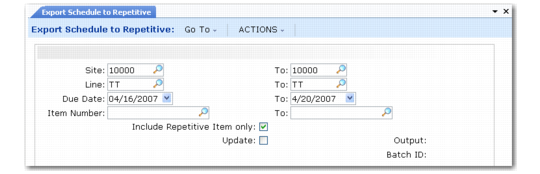
Use Export Schedule to Repetitive (17.13.10) to select flow scheduled orders for specified items and add them to line schedules. You can then place the orders on repetitive schedules in the Repetitive and Advanced Repetitive modules.
Enter selection criteria for the items that will have flow scheduled orders exported to repetitive schedules. To limit the selection to items that are usually produced on a repetitive line, set Include Repetitive Items Only to Yes. Set Update to No to review a report on the effects of running this program before updating the database. See
Purchase/Manufacture Codes.
Export Schedule to Repetitive (17.13.10)
When you click Next, the system searches for flow scheduled (type W) work orders that have no completions recorded for the items matching the selection criteria. If the item is not assigned to the repetitive production line in Production Line Maintenance (18.1.1 in Repetitive; 18.22.1.1 in Advanced Repetitive) or if the flow scheduled order has completions recorded, it is skipped.
Note: Only system-generated type W work orders are included in the search. If you created a flow scheduled order and manually entered a reference to a work order, you cannot export that flow scheduled order to Repetitive.
Based on the planned order due date, the system assigns the quantity of the item to the production line schedule for the appropriate date. If a line schedule already exists for a due date, the system adds the quantity from the flow scheduled order to that day’s requirement. You can then use Line Schedule Workbench (18.1.10 in Repetitive; 18.22.1.10 in Advanced Repetitive) and Repetitive Schedule Update (18.1.18 in Repetitive; 18.22.1.18 in Advanced Repetitive) to add them to repetitive schedules.
Important: When you export the flow scheduled order, the system automatically deletes the system-generated type W work order that was created with the flow scheduled order, along with the associated MRP detail record. Once the order is moved to the repetitive schedule by way of Line Schedule Workbench, a new MRP detail record is then created to reference that work order.
It is important to understand that if a planned work order is moved into flow using Import MRP Orders to Schedule (17.13.9), that planned work order is deleted and replaced with the flow work order—which becomes the only order visible to MRP. If you then move that same work order to repetitive (specifically the repetitive workbench), MRP no longer has knowledge of that work order. If MRP is run while the work order is still in the workbench, MRP may reschedule the requirements from the original planned work order that was moved to flow, then to repetitive—resulting in the same requirement being planned twice.
When you export a flow scheduled order, the system sets the Posted to Rep field in Flow Schedule Maintenance to Yes. You can no longer update the schedule or record completions for it in the Flow Scheduling module. Instead, process exported schedules just as you would any line on a repetitive schedule.
See
QAD Manufacturing User Guide for information on Repetitive and Advanced Repetitive functions.