Roll Up Item Data
Use Process Item Operation Rollup (17.1.12) to calculate setup, cycle time, run time, and yield percent data for process operations from routing records. This data is then available for use in supermarket and kanban sizing calculations.
Note: You should not run this program if you enter process times and yield percentages manually in Kanban Process Maintenance (17.1.3). If you do and the system finds routing records for the item, it will overwrite the manual values. See
Define Processes.
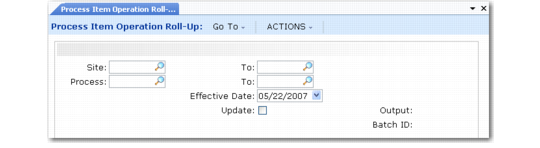
Process Item Operation Rollup (17.1.12)
Enter ranges of sites and kanban processes to select items for rollup. The system validates that you have security access to all sites within the specified range.
Only routing records with effective date ranges that include the specified date are selected.
To run the rollup in simulation mode without updating the database, set Update to No.
The system searches for items associated in Kanban Process Maintenance with processes matching the selection criteria. If a routing code is specified in Kanban Item Master Maintenance (17.1.1), that routing is used. Otherwise, the system uses the item number to find the default routing. It then calculates process-level values based on all the operations specified in Kanban Process Maintenance and updates the appropriate process item detail record in that program:
• Setup Time is set to the total of all the setup times defined in Routing Maintenance for operations in the Start/End Op range.
• Cycle Time is set to the longest run time among the operations.
• Work Time is set to the total of the run times for all the operations.
• Yield is set to the result of multiplying the yield percentages of all the operations.
Note: When you roll up routing times, rounding in the seconds field may display a slightly different result than manual calculations of the values specified for operations. However, the database stores the number to 10 decimal places, and this level of precision is available to system calculations.