Copy Kanban Data
Use Kanban Master Copy (17.1.5) to copy and modify kanban data for an item at one kanban loop to a new loop record. This lets you set up data quickly for multiple similar loops.
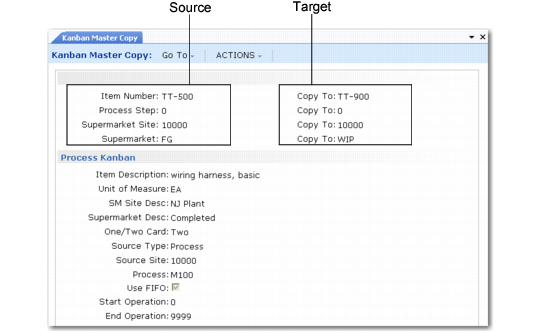
Enter key information about the source loop in the left column. You can enter an item number and use next/previous to scroll through existing loop records. The system displays basic information about the loop in the bottom frame. When you have identified the source loop, enter the key fields for the target loop.
To copy the number of replenishment and move cards (if applicable) to the new kanban master record, set Copy Number of Cards to Yes.
Note: You must define the target item using Kanban Item Master Maintenance before you can create a new loop.
Kanban Master Copy (17.1.5)
When you click Next, the system prompts you for confirmation. It then creates a new kanban record and assigns it the same values as the source, with the following exceptions:
• The next date and time values used by the accumulator function, defined in the Card Control Data frame in Kanban Master Maintenance, are set to blank. See
Next Date and Time.
• When the source and target item number are not the same, the system sets Daily Demand to 0 (zero) and Demand Percent to 100% in the Supermarket Item Detail frame. Otherwise, the values are copied from the source loop record. See
Daily Demand.
• For process and inventory loops with different source and supermarket sites, the system determines the source site in the new record using the following logic:
• If the source site and supermarket site in the original loop are the same but the Copy To supermarket site is different, the Copy To source site is the same as the Copy To supermarket site.
• If the source site and supermarket site in the original loop are not the same, the Copy To source site is the same as the original source site.
Note: Source sites are not associated with supplier loops.
• When Copy Number of Cards is Yes, the system sets the corresponding field on the new loop to the same value as the source loop. Otherwise, the new loop does not specify the number of replenishment and move cards. Update those values in Kanban Master Maintenance or the kanban workbenches.
You can then modify the kanban data values and make any necessary adjustments directly in Kanban Master Copy. The program works the same way as Kanban Master Maintenance.