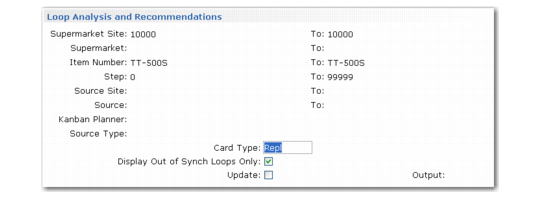
Loop Analysis and Recommendations
Use this function to view buffer and card information by status (active, inactive, and so on), as well as recommendations for synchronizing the number of active cards with the system-recommended maximum number of cards for each loop. This may require creating, activating, closing, or inactivating cards. Optionally, you can have the system implement recommended changes.
Note: This function does not do kanban sizing; it only adjusts the number of cards used to support existing buffers.
Kanban Card Management, Loop Analysis and Recommendations Frame
Leave Update set to No to run the report in simulation mode so that you can review the proposed changes. Change Update to Yes to have the system automatically adjust the number of cards in selected loops. When you update kanban loops, the output report includes a list of individual kanban cards that were created, activated, closed, or inactivated. The simulation report does not include card-level information.
For reporting and analysis purposes, you can include loops that the system considers to have the correct number of active cards by setting Display Out of Synch Loops Only to No. When Update is Yes, the system does not modify these loops.
If additional cards are needed, the system uses the phase-in method specified in Kanban Control to determine if inactive cards should be activated before new ones are created.
If fewer cards are needed, the system first checks the value of the Decrease at Consume field specified for the loop in Kanban Master Maintenance.
• When Decrease at Consume is Yes, the system does not inactivate or close cards as part of this program, although inactivate and close recommendations display on the analysis report. Instead, because of the logic associated with the Decrease at Consume field, the cards are inactivated the next time they are recorded in Kanban Consume/Post. The system displays a message to inform the user that the card should be physically removed from the loop.
• When the field is No, the system uses the phase-out method specified in Kanban Control to determine if cards should be closed or inactivated.
As part of the analysis task, the system verifies that the kanban quantity on the card matches the current kanban quantity for the loop. If it detects cards where this is not true, it sets the Regenerate Required field for the loop to Yes. When you run the program in update mode, this causes all existing cards to be replaced by a new set of cards, regardless of the setting of Decrease at Consume. The phase-out method specified in Kanban Control determines how the cards being replaced are inactivated.