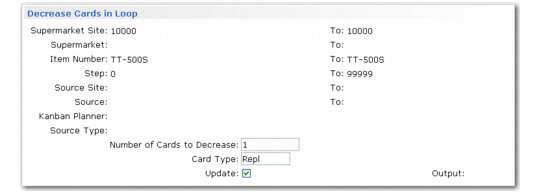
Decrease Cards in Loop
Use this function to decrease all selected loops by a constant number of cards.
Kanban Card Management, Decrease Cards in Loop Frame
Specify the number of cards to remove from each loop, as well as the card type (replenishment, move, or both).
When Update is Yes, the program always removes cards with a status of Empty Accumulate first by inactivating them immediately. If you want to reduce the loop by more than the available number of empty cards, the system next looks for cards closest to the Empty Accumulate status in the following sequence:
1 Full
2 Shipped
3 In FIFO
4 Acknowledged
5 Authorized
When more than one card is in the target status, the system begins by selecting cards that have been in that status for the longest time. It uses the phase-out method specified in Kanban Control to determine whether the cards should be inactivated immediately or have their active status set to Close so they can be inactivated the next time they are recorded in Kanban Consume/Post.
The system uses this logic regardless of the Decrease at Consume setting defined in Kanban Master Maintenance.
Regardless of the value of Update, the system generates a report summarizing the effects of the program on each selected loop. It is organized by supermarket site, supermarket, item, step, source site, source, and card type. When Update is Yes, the report also displays the action taken on each individual card, in kanban ID sequence.
Note: This function does not perform any resizing functions. Removing cards from a loop may cause sizing to be out of synch with the actual number of cards. Use the kanban workbenches to do any needed sizing, or the Kanban Analysis and Recommendation function in Kanban Card Management to realign the actual number of cards to the loop’s sizing values.