Alternate Product Line Accounts
In some applications, you may need to set up alternate accounts for the same product line.
For example, you can specify only one Inventory account in Product Line Maintenance (1.2.1). If different locations within a site are used for raw materials, WIP, and finished goods, you probably do not want to post inventory transactions for these locations to the same Inventory account.
You can set up alternate accounts in the following programs:
• Assign purchasing accounts to sites or sites and supplier types in Purchasing Account Maintenance (1.2.5).
• Assign work order accounts to sites in Work Order Account Maintenance (1.2.9).
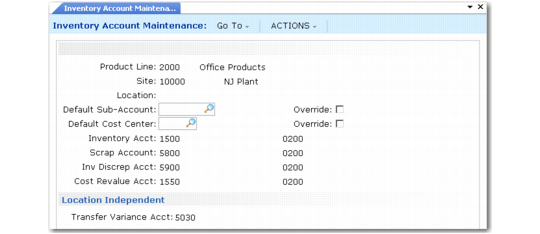
• Assign inventory accounts to sites or sites and locations in Inventory Account Maintenance (1.2.13).
• Assign sales accounts to sites, sites and customer types, sites and distribution channels, or sites, customer types, and channels in Sales Account Maintenance (1.2.17).
If you want to use the product line account code but modify the sub-account or cost center, specify the new sub-account or cost center in the Default field and set the associated Override field to Yes.
Inventory Account Maintenance (1.2.13) illustrates Inventory Account Maintenance. The other alternate account programs are very similar.
Inventory Account Maintenance (1.2.13)
Note: The Transfer Variance account is defined for only the combination of product line and site. Location is ignored.
During transaction entry, the system automatically retrieves and uses most alternate inventory and purchasing accounts. Alternate work order and sales accounts are retrieved and displayed and can be modified if needed.