Copied Product Line Accounts
Use Product Line Accounts Copy (1.2.22) to create a new set of accounts by copying an existing product line account type. You can copy any of the following account types:
• Purchasing accounts
• Work order accounts
• Inventory accounts
• Sales accounts
• Inbound accounts
• Outbound Accrual accounts
• Outbound Expense accounts
• They needed to be copied.
• PO Price Variance accounts
• Broker Expense accounts
• Suspense accounts
Note: Inbound, Outbound Accrual, and Outbound Expense accounts are used with the optional Logistics Accounting module.
You can also use Purchase Gain/Loss Account Copy (26.22) to copy these accounts.
This function lets you quickly create sets of similar accounts.
Example: You require sales accounts by site and all elements of the account are the same except the sub-account. Create one set of sales accounts for the first site. Then use Product Line Accounts Copy to copy this set to the second site. Modify the copied data with the new sub-account value.
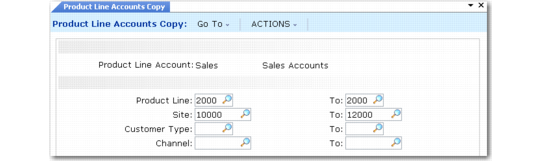
After entering an account type such as sales, you enter the values that identify the set of accounts you want to copy on the left, and the values that you want created on the right.
Product Line Accounts Copy (1.2.22) illustrates copying the sales accounts for product line 2000 from one site to another.
Product Line Accounts Copy (1.2.22)
After you copy the programs, the system displays the same frame as in Sales Account Maintenance (1.2.17). You can access and edit the new product line accounts you copied directly or in the maintenance program associated with that account type.
You can edit all associated data for the record, except for the header fields that uniquely identify the new record. For many product line account types, the system uses a combination of fields—for example, the product line code, site, and supplier type—to further identify the accounts. After you copy a record, these fields are display only.