Copied Records
To use PCRs and PCOs, you first create new production and planning records, or copy existing records into PCRs/PCOs from production database tables. You can also create a new structure, routing, formula, or process record from production or from within PCC by copying an existing one to a new name, then optionally modifying it.
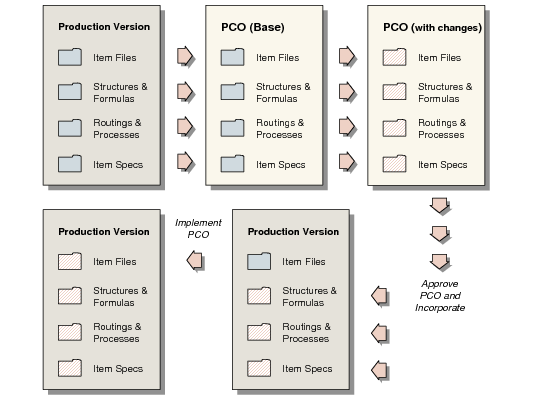
After you copy production records, you can modify them and specify the required product changes. These changes do not affect the data used for production and planning until the PCO is approved and incorporated. When this happens, modified records and any new records are copied from the PCO back into the production environment.
PCO Change Process illustrates the process of copying data into a PCO, making changes, and updating the production tables.
PCO Change Process
Product changes are copied into production and planning tables after an effective date is set for a PCO. The effective date becomes the start date for new records. This way, product changes can be used for planning before the actual effective date arrives and before the records are used for production.
Any changes made by a PCO to item records are copied into master item tables in a separate implementation step on the PCO effective date.