Creating PCRs and PCOs
This section focuses on creating PCOs in PCO Maintenance (1.9.2.13). PCR Maintenance (1.9.2.1) is almost identical to PCO Maintenance and is not described separately. It contains two additional functions that enable you to create a PCO based on an approved PCR.
PCO Maintenance (1.9.2.13) is a large and complex program used to create PCOs and add and modify all product change data, including any of the following types:
• Basic header data
• Text detail
• Item detail
• Item-site detail
• Product structure/formula detail
• Routing/process detail
• Item specification detail
• Trailer data
Submenus in PCO Maintenance enable you to navigate from one PCO section to another.
The header frame of PCO Maintenance contains basic information about the PCO.
PCO Maintenance (1.9.2.13), Header Frame
A PCO is uniquely identified by a combination of Number, ID, and Domain fields. If you enter a combination that does not already exist, a new PCO is created. An error displays if you try to perform maintenance on a distributed PCO, and a warning displays if you open a PCO already routed for approval. If you continue despite the warning, any approvals are essentially revoked, and the document must be rerouted for approval.
If you do not enter a number and Auto Number is Yes in PCC Control, the system automatically generates a number based on your entries in PCO Type and Design Group. PCO Type determines the prefix and number, which default from PCC Control.
ID
Enables you to create multiple PCOs with the same PCO number for grouping purposes. Typically used to divide large PCOs into smaller ones for ease of implementation. When you open a PCO with a shared number and different ID, you are warned that related PCOs exist.
Domain
Use this field to enter an optional domain name; the field is not validated and does not automatically create any physical link to, or interaction with, another system database. This field is intended for multi-domain installations where product development and manufacturing are performed at separate locations. In this case, the same change can have different implementation details at different factories, accommodating variations in specific item numbers, work centers, and so on. Domain then becomes an important selection criterion in PCR/PCO Import/Export (1.9.13).
Type and Design Group
This combination must be defined in PCR/PCO Type Maintenance (1.9.1.9). The values specified determine the approval cycle, distribution group, and document change type. If a number is not entered and autonumbering is used, this combination also determines the PCO number.
Note: Review routing slip and distribution group data for a PCO in the trailer, using the Trailer Maintenance menu. The same information displays in PCR/PCO Close (1.9.14).
Once you have created or accessed a PCO, you can enter and change Title, Reason, Class, Originator, and User Codes. These are user-defined and typically used to provide PCO reference summaries. They do not affect PCO processing, but display in PCO Browse (1.9.2.14), Print PCR/PCO (1.9.9.1), and Release and Distribution (1.9.7.1).
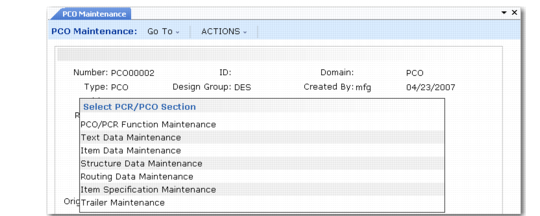
After entering basic PCO data, a section menu enables you to navigate elsewhere in PCO Maintenance. Click the arrow next to a menu selection to activate it.
PCO Maintenance, Section Menu