Approving PCRs and PCOs
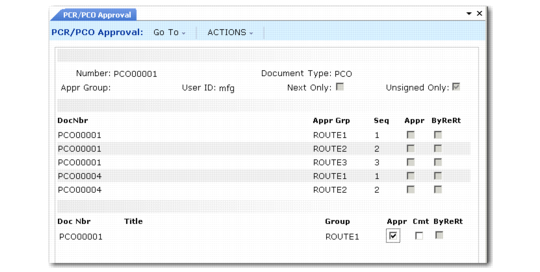
Approve PCOs using PCR/PCO Approval (1.9.6.1). Designated reviewers can enter electronic approvals or disapprovals, along with comments.
When Enforce PCO Approval Group Sequencing is Yes in PCC Control, users must follow the correct sequence during approval.
PCR/PCO Approval lists approval records by criteria you enter at the top of the screen. Enter a PCO number to have approvals listed starting with that PCO. Either PCRs or PCOs can be listed depending on the value entered in Document Type. When multiple approval records exist for a document, they are listed by approval sequence.
Specify an approval group to display only approvals required of that group. Specify a user ID to display only approvals required of groups that include that user.
PCR/PCO Approval (1.9.6.1)
Unsigned Only
Enter Yes to display pending approvals. If Yes, documents are excluded from the display when only one of several groups has given approval.
Enter No to display both approved/disapproved and pending approvals. For each required approval, the group designated to perform the approval displays.
Appr
Enter No to disapprove previously approved PCOs. Enter Yes to approve previously disapproved PCOs.