QAD 2017 Enterprise Edition
>
User Guides
>
Master Data
>
Regulatory Attributes
>
Defining Inventory Attributes
Defining Inventory Attributes
Attributes are critical to managing the flow of inventory in a warehouse. Of the various attributes, status is the most important, since you can restrict transactions based on status. When Compliance Active is Yes, you have more options for setting and using attributes.
Typically, the status of an item is determined by its location. In a regulated environment, a special status for quarantined items is often created and assigned to a particular location. Quarantined items are held in that location until they are inspected, approved for use, and transferred to a stocking location.
The use of separate physical locations may not be required, however, if items are marked for quarantine with some other method. For example, some companies use a removable label. You can use inventory statuses to support this business methodology.
To implement this practice, you first create a quarantine status in Inventory Status Code Maintenance (1.1.1). Then specify this status as the active default for purchase order and work order receipts in Item Master Maintenance. When items are received, the system assigns each lot a quarantine status, overriding the status of the location. After the lot is inspected and approved, the inventory status can be changed using Multi‑Lot Inventory Detail Update (1.22.19). The lot no longer needs to be physically transferred to change its status.
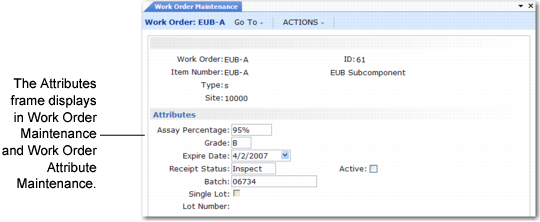
Work Order Maintenance (16.1), Attributes Frame illustrates setting inventory attributes in the work order Attributes frame. While batch and lot numbers are not technically attributes, they are located on the same frame so that they can be entered at order creation and updated during work in process. You can also set default inventory attributes for purchase orders and repetitive transactions.
Work Order Maintenance (16.1), Attributes Frame
Work order attributes are stored in the work order master. When a work order is created, Receipt Status and Active default from Item-Site Inventory Data Maintenance (1.4.16). If Compliance Active is Yes, you can assign work order attributes, batch number, and lot number to end items in Work Order Maintenance (16.1). When Compliance Active is No and the item is lot controlled, only the Single Lot field can be modified.
When you receive items into inventory, you can modify assay %, grade, expire date, and receipt status, unless items with the same lot and reference numbers already exist in the location with different attributes. If you have not specified attributes on the work order and no inventory detail records exist, the system assigns default values from location or site records.
Note: You can always modify attributes at receipt, regardless of the setting of Compliance Active.