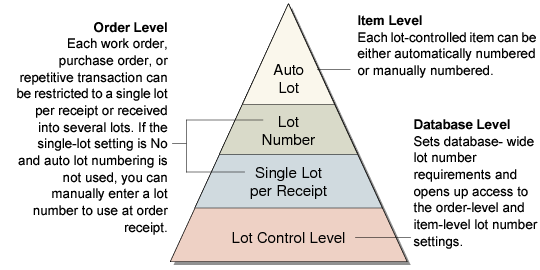
Lot Control Relationships
The settings described in
Lot Control Hierarchy, along with the auto-lot settings in Item Master Maintenance (1.4.1), affect lot numbering on several levels.
Lot Control Hierarchy
Lot Control Level
This database-level setting is the most straightforward to employ. If you want to use single lot per receipt settings, Lot Control Level must be 1 or 2. If you do not want to use either of these features, you can still use Lot Control Level to control lot number uniqueness for each item (level 1) or across all items in inventory (level 2).
Single Lot per Receipt and Lot Number Field
If you select level 1 or level 2 lot control, then you can use single-lot settings. You can have a different default setting for work orders, purchase orders, and repetitive transactions. Further, the single-lot setting can be changed for each order at the time of receipt. A receipt lot number can be specified in the Work Order Attributes frame when the single-lot setting is No and auto lot numbering is not used.
Auto Lot Numbering
Automatic lot numbering works with any lot level setting. Since automatic lot numbering is set for each item, you can choose to have some items auto numbered and some not.