Automatic Lot Numbering
Use Lot Group Maintenance (1.22.13) to create lot groups defining the format for automatic lot numbering. You can restrict lot groups to individual sites or they can apply to all sites. Assign lot groups to items in Item Master Maintenance (1.4.1), Item Inventory Data Maintenance (1.4.5), or Item Master Copy (1.4.12).
If a lot group record is altered or removed after lot numbers have been generated, the continuity of lot numbers will be broken. Additionally, automatically generated lot numbers are not recycled if they are not used at the time they are assigned. It is possible for gaps to appear in the sequencing of auto lot numbers if, for example, a receipt transaction is canceled before inventory is received.
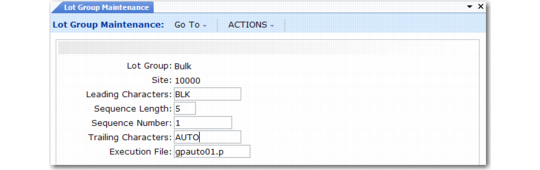
Lot Group Maintenance (1.22.13)
Lot Group
Assign a name to the automatic lot numbering format. Name can be up to eight alphanumeric characters.
Site
Enter a value if you want this lot group to be used at one site only. Leave blank if the lot group can be applied to any site.
Leading Characters
Enter up to 12 characters to be placed at the beginning of the lot number. Can be left blank. The lot number, including leading characters, sequence number, and trailing characters, can be up to 18 characters long.
Sequence Length
Enter a number between 5 and 10. This is the length of the numeric portion of the automatic lot numbers.
Sequence Number
The default is 1. Enter the first number to be used in automatic lot numbering. The lot number consists of this number, plus leading and trailing characters.
The smallest number available for assignment is 00001 and the largest is 9999999999. If you are using a six-digit sequence length, you may want to start automatic lot numbers with 100000 instead of 1. This number increments by 1 when numbers are assigned.
Trailing Characters
Enter up to 12 characters to be placed at the end of the lot number. Can be left blank.
Execution File
The program to execute when assigning automatic lot numbers. The default is gpauto01.p, the standard program supplied with the system. You can create custom programs to assign lot numbers based on your own requirements.
Assigning Lot Groups to Items
Use one of the item maintenance programs to set up items for automatic lot numbering:
• Item Master Maintenance (1.4.1)
• Item Inventory Data Maintenance (1.4.5)
• Item Master Copy (1.4.12)
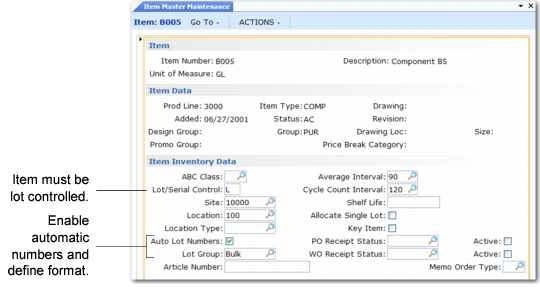
Item Master Maintenance (1.4.1)
Three fields affect automatic lot numbers:
Lot/Serial Control
Automatic lot numbering only works with lot‑controlled items (set to L). It does not work with serial-controlled items.
Auto Lot Numbers
Yes activates automatic lot numbering for this item if L is selected in Lot/Serial Control.
Lot Group
An optional lot group format. If Lot Group is blank, Lot/Serial Control is L, and Auto Lot Numbers is Yes, work orders are assigned a lot number equal to the Work Order ID. However, lot numbers must be entered manually on purchase order and repetitive receipts in this case. See
Automatic Lot Numbering.
Creating Automatic Lot Numbers
When receipts are created for purchase orders and work orders that contain items set up for automatic lot numbering, the system generates a lot number according to the Lot Group format assigned to the item. The lot number cannot be changed. The following programs assign automatic lot numbers:
• Purchase Order Receipts (5.13.1)
• RTS Receipts (11.7.3.13)
• Work Order Receipt (16.11)
• Work Order Receipt Backflush (16.12)
• Work Order Operation Backflush (16.19)
• Repetitive Labor Transaction (18.14)
• Backflush Transaction (18.22.13)
• Move Transaction (18.22.19)
Note: Rework and expense work orders cannot be assigned automatic lot numbers.