Setting Up GL Accounts
You can define default GL accounts, sub-accounts, and cost centers that are accessed when logistics charges are accrued and invoiced. Separate sets of accounts can be used to track inbound and outbound logistics charges. For outbound logistics charges, you can use separate sets of accounts to track the costs associated with shipments to customers and shipments to other company locations. See
QAD Financials User Guide for information on setting up accounts.
Each logistics charge account is identified by an account code, an optional sub‑account code, and an optional cost center code. Use GL Account Create (25.3.13.1) to set up GL accounts before defining default logistics accounts in the Logistics Accounting module.
Logistics Charge Accounts lists the accounts used by Logistics Accounting. The Type column indicates how the account is used. The Use column indicates the transaction that uses the account.
Logistics Charge Accounts
|
|
Account
|
Type
|
Use
|
|
Inbound
|
Accrual
|
Liability
|
PO Receipt, Invoice
|
|
Expense
|
Expense
|
PO Return
|
|
Variance
|
Expense
|
Invoice
|
|
Suspense
|
Expense
|
PO Receipt
|
|
Broker
|
Expense
|
PO Receipt
|
|
Outbound
|
Sales Order Accrual
|
Liability
|
Shipment, Invoice
|
|
Sales Order Expense
|
Expense
|
Shipment
|
|
Sales Order Variance
|
Expense
|
Invoice
|
|
Distribution Order Accrual
|
Liability
|
Shipment, Invoice
|
|
Distribution Order Expense
|
Expense
|
Shipment
|
|
Distribution Order Variance
|
Expense
|
Invoice
|
Note: When Logistics Accounting is used, the Sales Freight Applied and Sales Freight Accrued accounts defined in Domain/Account Control (36.1) are not used for logistics charge accrual transactions, unless you specify the same accounts in Outbound Accrual Account Maintenance and Outbound Expense Account Maintenance.
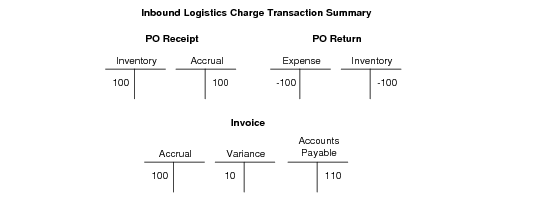
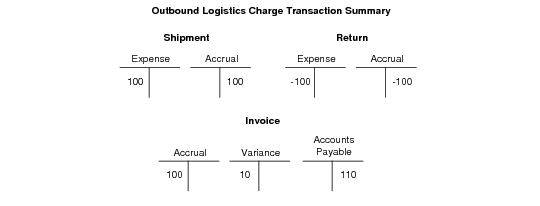
The following illustrations show the functions that create GL transactions for logistics charges and the accounts used. In both examples, an invoice in the amount of $110 is received from the logistics supplier and applied to the accrued amount.
Inbound GL Transactions summarizes the GL transactions created and accounts used to track inbound logistics charges. Inbound logistics charge accruals are triggered by purchase receipts.
Inbound GL Transactions
Outbound GL Transactions summarizes the GL transactions created and accounts used to track outbound logistics charges.
Outbound GL Transactions
Suspense and Broker Expense Accounts
You use the Suspense and Broker Expense Accounts in Logistics Accounting with the Fiscal Receiving module. The two accounts are editable only when Fiscal Receiving is enabled.
Suspense Account
When you use standard costs, the system uses the Suspense Account to account for logistics accounting charges during RCT-PO functions—such as PO receipt, PO shipper receipt in in-transit, PO shipper receipt. You should receive goods at full standard cost to inventory, regardless of whether you use Fiscal Receipts.
When you receive, the system credits the Suspense Account with Logistic Accounting costs, debiting inventory at full standard cost. Additionally, the GL inventory account has the full standard cost value after the physical receipt, and GL and operational inventory valuation reports balance at all times.
When you confirm Fiscal Receiving, actual Logistics Accounting costs are committed and the Suspense account is debited with the actual LA costs. The system adjusts for the difference in the actual LA cost and the value is credited to the Suspense account by debiting/crediting the Logistics Account price variance (LA PPV).
When Fiscal receiving is not in use, the system calculates LA PPV values, the LA Suspense account is not visible in cost reports, and the account is not accessible in Logistics Accounting screens.
Broker Expense Account
This field is for use with the Fiscal Receiving module and is editable only when Fiscal Receiving is enabled. When you use standard costs, the system uses the Broker Expense Account to account for logistics accounting importation charges during physical receipt. Crediting the Broker Expense Account with Logistic Accounting costs during receipt lets the system debit inventory at full standard cost.
When you confirm Fiscal Receiving, actual Logistics Accounting costs are committed and the Broker account is debited with the actual LA costs. The system adjusts for the difference in the actual LA cost and the value is credited to the Broker account by debiting/crediting the Logistics Account price variance (LA PPV).
When Legal Documents and Fiscal Receiving are not in use, the Broker account is not visible in cost reports, and is not accessible in Logistics Accounting screens.