Defining Detailed Logistics Accounts
Although inbound and outbound logistics accounts are defined for each logistics charge in Logistics Charge Code Maintenance, you may want to define logistics accounts at a more detailed level.
You can separately track logistics charges by product line at multiple sites within the same entity. For example, you may want to track logistics charges for different product lines at different sites using separate accounts.
Use the following programs to specify GL accrual, expense, and variance accounts used for inbound and outbound logistics charges by product line, site, and supplier or customer type:
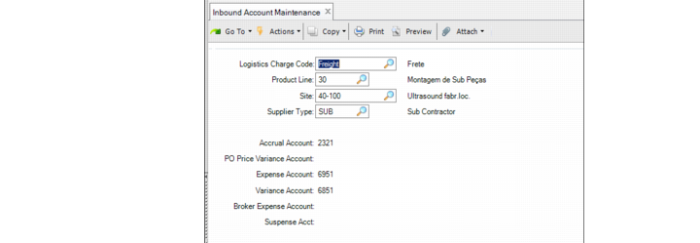
• Inbound Account Maintenance (2.15.13)
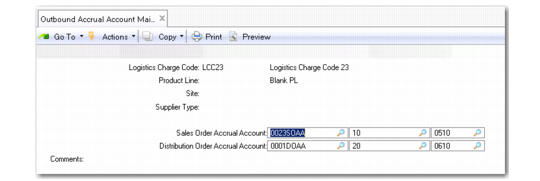
• Outbound Accrual Account Maint (2.15.16)
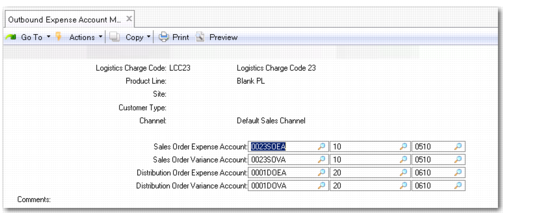
• Outbound Expense Account Maint (2.15.19)
All accounts default from the specified logistics charge code, but you can change them.
Inbound Account Maintenance (2.15.13)
Logistics Charge Code
Enter a logistics charge code previously defined in Logistics Charge Code Maintenance.
Product Line
Enter the product line to associate with these accounts.
Site
Optionally enter the site to associate with these accounts. Site security is enforced. When blank, the user must have access to all sites in the system. If you enter a supplier type, you must enter a specific site. See
QAD Security and Controls User Guide for details about site security.
Supplier Type
Optionally enter a code classifying item suppliers by type. During PO receipts and returns, the system searches for GL accounts using the supplier type of the item supplier, not the logistics supplier.
This field is validated against codes set up in Supplier Type Create.
Accrual Account
This field defaults from account information that was entered in Logistics Charge Code Maintenance. It can also be changed or entered manually.
PO Price Variance Account
This field defaults from account information that was entered in Logistics Charge Code Maintenance. It can also be changed or entered manually.
Expense Account
This field defaults from account information that was entered in Logistics Charge Code Maintenance. It can also be changed or entered manually.
Variance Account
This field defaults from account information that was entered in Logistics Charge Code Maintenance. It can also be changed or entered manually.
Suspense Account
This field defaults from account information that was entered in Logistics Charge Code Maintenance. For more information, see
Suspense and Broker Expense Accounts.
Broker Expense Account
This field defaults from account information that was entered in Logistics Charge Code Maintenance. It can also be changed or entered manually. For more information, see
Suspense and Broker Expense Accounts.
Outbound Accrual Account Maintenance (2.15.16)
Supplier Type
Optionally enter a code classifying suppliers by type. During shipment processing, the system searches for GL accounts using the supplier type of the logistics supplier. If you enter a supplier type, you must enter a specific site.
This field is validated against codes set up in Supplier Type Create.
Outbound Expense Account Maintenance (2.15.19)
Customer Type
Optionally enter a code classifying customers by type. During shipment processing, the system searches for GL accounts using the type of the order customer.
This field is validated against codes set up in Customer Type Create.
Channel
Optionally enter a code identifying a distribution channel.
This field is validated against codes set up in Generalized Codes Maintenance for field so_channel.
When searching for GL accounts, the system first looks for a match in the detail logistics accounts. If no match is found, the accounts entered in Logistics Charge Code Maint for the logistics charge are used.
When searching for a match in the detail accounts, the system uses the following hierarchy:
1 Matching logistics charge code, product line, site, and supplier or customer type
2 Matching logistics charge code, product line, and site with a blank supplier or customer type
3 Matching logistics charge code and product line