Updating Freight Terms
Assign a logistics charge to each freight term with an accrual level in Freight Terms Maintenance (2.20.13). The system uses the type code to determine whether freight charges are accrued (and, if so, at what level) at the order line or for the entire shipment. See
Setting Up Freight Charges for details on freight terms.
The level of accrual is determined as follows:
• No Accrual. When Type is 4 (Collect) or 6 (Will Call), logistics charges do not accrue. A logistics charge cannot be assigned to either of these freight terms.
• Accrue by Shipment. When Type is 1 (Add) or 2 (Allow), logistics charges are accrued for the entire shipment. Calculated freight amounts are tracked using the outbound accrual and expense accounts defined for the logistics charge code in Logistics Charge Code Maint (2.15.1).
• Accrue by Line. When Type is 3 (Prepaid) or 5 (Include), logistics charges are accrued for each order line item. Calculated freight amounts are tracked using the accrual and expense accounts defined for the logistics charge code in Outbound Accrual Account Maint (2.15.16) and Outbound Expense Account Maint (2.15.19). If detail accounts are not defined in these programs, the system uses the outbound accrual and expense accounts defined for the logistics charge code in Logistics Charge Code Maint.
When logistics charges are accrued by shipment or by order line, you must assign the logistics charge code used to track the logistics charges incurred and payable to a third-party carrier.
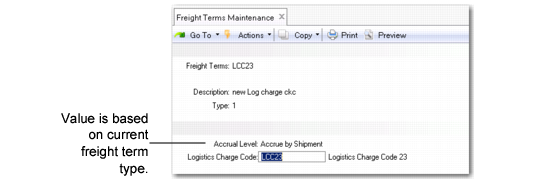
Freight Terms Maintenance (2.20.13)
Logistics Charge Code
Enter a code identifying a logistics charge. When Type is set to 4 (Collect) or 6 (Will Call), logistics charges are not accrued. The lower frame displays but cannot be updated.
Freight Lists
Freight lists collect information on different types of freight. Create a new freight list in Freight List Maintenance (2.20.1) and find existing freight lists in Freight List Browse (2.20.2). See
Freight List Maintenance.
Manage other aspects of freight control by specifying freight zones in Freight Zone Maintenance (20.2.4) and freight classes in Freight Class Maintenance (2.20.7). See
Freight Zone Maintenance and
Freight Class Maintenance.
Search for previously created freight charges with Freight Charges Browse (2.10.11) and generate reports on them with Freight Charges Report (2.10.12).