Lot Trace Workbench Flowcharts
Depending on the production processes, you must be able to trace backward and forward across transactions on multiple levels in a product structure. Lot Trace Workbench allows you to navigate backward and forward in historical transaction data to track and trace inventory lots through multiple levels in the receipt, production, inventory, and shipment processes. You can extract specific data for further analysis or auditing purposes as well as save selection criteria so that you can come back to previous trails.
Tracing Backward and Forward Using LTWB
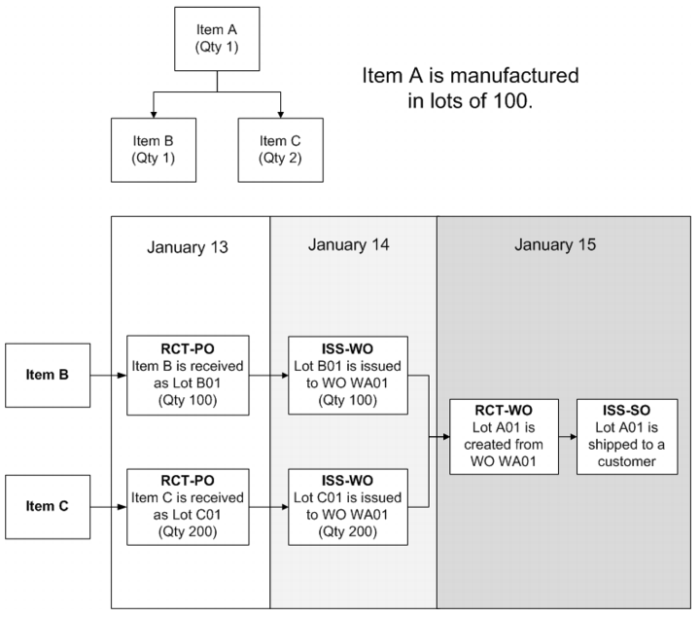
In the following example, item A is made from item B (qty 1) and item C (qty 2). Item A is manufactured in lots of 100. An ideal process flow to manufacture and ship Item A would look like
Example of an Item’s Process Flow:
• On January 13, items B and C are received into stock as Lot B01 and Lot C01.
• On January 14, a work order is created (WO WA01) to build qty 100 Item A. Lot B01 and lot C01 are issued to WO WA01.
• On January 15, WO WA01 is completed. Lot A01 is created from WO WA01. Lot A01 is shipped to the customer.
Example of an Item’s Process Flow
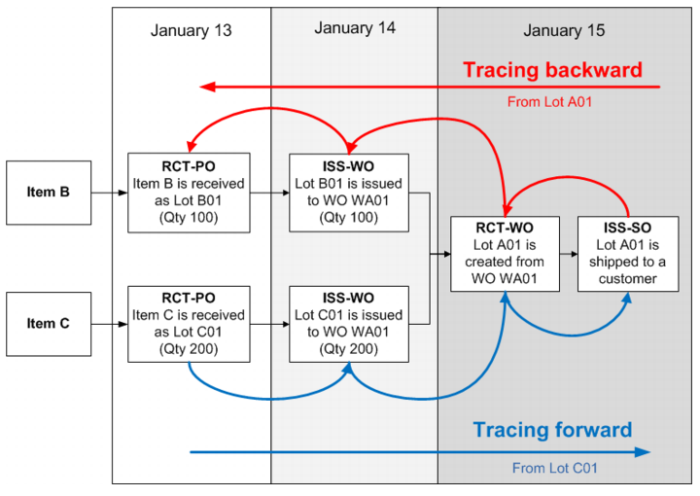
If a customer calls and reports that item A is defective, you can use Lot Trace Workbench to trace backward using either the sales order number and/or lot number that was shipped to the customer. Using the sales order number, you can find the item A lot number that was shipped to the customer, the work order that item A was manufactured on, and the item B and C lot numbers.
Note: Typically, the first option is to search forward or backward from a lot number, and the second option is to search from an order number.
If a supplier calls you and reports that one or more lots for item C may have defects, you can use Lot Trace Workbench to trace forward using the purchase order number. You can find the lots for item C, the work orders that item C was issued to, and the lot numbers for manufactured items such as item A that contain the lots for item C, and shipments for the manufactured item lots to customers.
Tracing Backward and Forward Using LTWB
Using LTWB to Trace Where Material Has Been Used
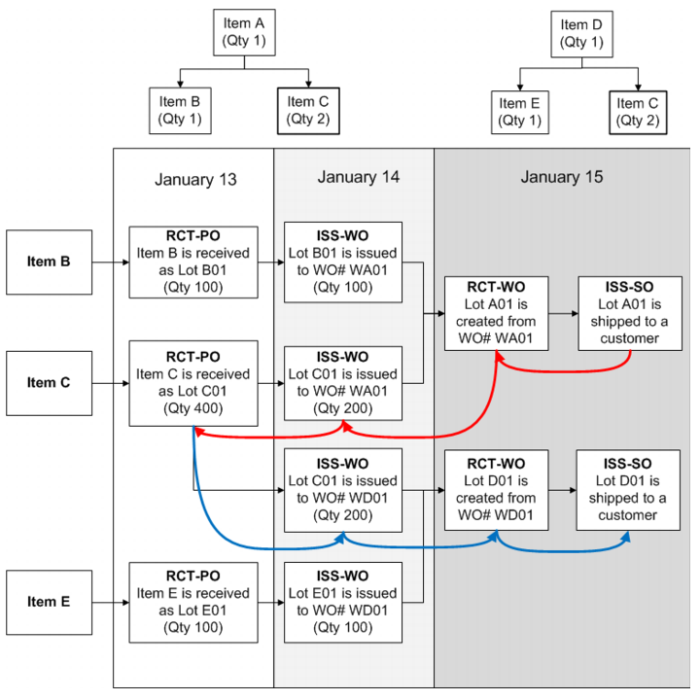
Expanding on the previous example, item C is also used to make item D. If it was discovered that item C is defective, you can use Lot Trace Workbench to trace where item C has been used.
Tracing Where Material Has Been Used shows that you can trace backward from the sales order and find out that item C was also used in item D (lot D01).
Tracing Where Material Has Been Used