Extracting Data for Analysis
Before the system can analyze obsolete inventory, it extracts the data to be analyzed. You can optionally extract data at any time using Extract Consumption (3.5.1.7), as long as you extract before you run Obsolete Inventory Analysis (3.5.1.9). If you do not extract data using Extract Consumption, the system extracts data at the time you perform the analysis. If you set Retain Consumption Data to Yes in Obsolete Inventory Control (3.5.1.24) and you previously extracted data using Extract Consumption, the system uses the previously extracted data when you run the analysis.
If you extract data before the analysis using Extract Consumption, the system retains the data in a table. Depending on the length of time from which you extract transactions and the number of transactions, extraction can be time consuming. To avoid the system overhead associated with creating and maintaining the consumption table in Extract Consumption, you can extract data in Obsolete Inventory Analysis. When you extract in Obsolete Inventory Analysis, the system stores the data in temporary tables, then deletes the data.
You specify the type of transaction data you want the system to extract in Extract Issue Transactions in Obsolete Inventory Control (3.5.1.24). The system extracts data from the transactions to determine inventory consumption. The system extracts consumption data based on item, site, year, and period. See page
here.
You can specify how consigned inventory displays in the Customer Consigned and Supplier Consigned fields if you use the optional Customer Consignment Inventory or Supplier Consignment Inventory modules. You can also optionally include non-nettable or negative inventory.
You specify one of two methods to extract consumption:
• Initial extraction of all data starting at the date you specify up to the current date
• Incremental extraction of transactions since the previous extraction
Incremental extraction starts at the next transaction after the last transaction date and time the system recorded and displays in the Last Transaction Extracted field in this program and in Obsolete Inventory Control. The system extracts every transaction from the date in Last Transaction Extracted up to the time you initiate the extraction. The system then overwrites Last Transaction Extracted with the current extraction date.
If you set Extract Quantity on Hand to Yes, the system extracts the quantity on hand (QOH) balance as of the extraction date for both initial and incremental builds.
The system creates a consumption history record (iach_hist) with 0 (zero) consumption, if some QOH exists and there is no consumption in the specified period. It creates the history record only for the last period, if there are multiple periods involved in a single extraction and no consumption.
You should set the following controls and options in Obsolete Inventory Control before you extract consumption data:
• Set Retain Consumption Data to Yes. If set to No, you cannot extract and store data.
• Set Use ABC Analysis to No. If set to Yes, the system uses existing ABC analysis data when you run Obsolete Inventory Analysis (3.5.1.9).
• Specify a specific site for transactions or leave Site blank for all sites.
• Optionally, specify transaction types to extract.
• Optionally, specify a filter program for extracted data or use the default filter program.
Use Consumption Delete/Archive to delete or archive consumption data.
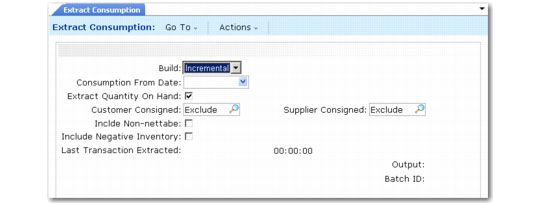
Extract Consumption (3.5.1.7)
Build
Indicate the method you want this program to use to extract consumption data.
Initial: Extract all data starting at the date you specify in Consumption From Date up to the current date. The system collects transaction data and builds consumption data by item, site, year, and period.
Incremental: Extract all transaction data since the previous extraction. Incremental extraction starts with the first transaction that occurred after the last transaction date and time the system stores and displays in Last Transaction Extracted in this program and in Obsolete Inventory Control. The system extracts every transaction from the date in Last Transaction Extracted up to the time you initiate the extraction. The system then overwrites Last Transaction Extracted.
Consumption From Date
Enter the date for an initial build of consumption data. The system extracts consumption data from this date up to today’s date. The system stores consumption data by item, site, year, and period. The system uses the GL calendar to convert transaction dates to a year and period.
Extract Quantity on Hand
Indicate if the system extracts Quantity on Hand (QOH) balances for initial and incremental builds.
No: The system does not extract the QOH balance.
Yes: The system extracts the QOH balance as of the extraction date for both initial and incremental builds.
Customer Consigned, Supplier Consigned
Specify whether the system extracts customer or supplier consignments for initial and incremental builds.
Exclude: Exclude customer or supplier consignment inventory.
Include: Include customer or supplier consignment inventory.
Only: Only customer or supplier consignment inventory.
Include Non-nettable Inventory
Indicate whether to include or exclude non-nettable inventory when calculating inventory supply usage for the quantity on hand for the items in the inventory type you specified.
No: Exclude non-nettable inventory when calculating supply usage.
Yes: Include non-nettable inventory when calculating supply usage.
Include Negative Inventory
Indicate whether the system includes negative quantity on hand (QOH) when calculating consumption.
No: The system does not use negative QOH when calculating consumption.
Yes: The system uses negative QOH when calculating consumption. The system displays items with negative QOH on coverage and reserve reports. Coverage periods and reserve amounts display as 0 (zero), not negative numbers.
Last Transaction Extracted
This field is display only and lists the system date and time of the last inventory transaction the system extracted. This field also displays in Obsolete Inventory Control.