Aggregated Display of DOH Data in Browse Collections
A number of .NET UI browse collections on the DOH Analysis Menu display aggregated DOH data over time. For example, this allows materials managers to look for trends to help in future planning.
To make the data available in a form suitable for aggregated views, use Build Days On Hand Analysis (3.5.3.3) to extract data and create records that can be used to calculate aggregate DOH. To examine what-if scenarios, you can specify up to three Horizon Days values for displaying data in the aggregated views.
Available browse collections include:
• View Days On Hand By Buyer/Date
• View Days On Hand By Commodity/Date
• View Days On Hand By Date
• View Days On Hand By Site/Date
• View Days On Hand By Supplier/Date
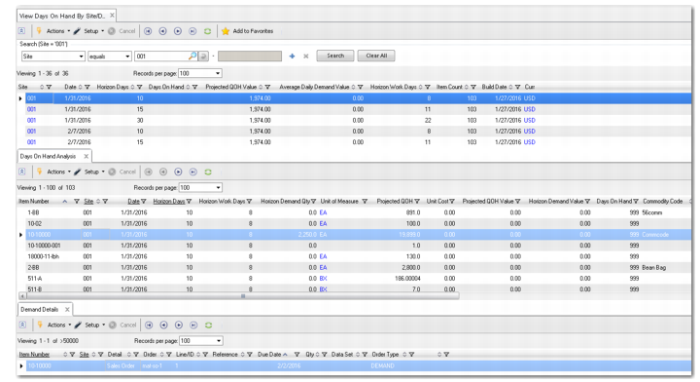
View Days On Hand By Site/Date shows View Days On Hand By Site/Date as an example.
View Days On Hand By Site/Date
From the top-level browse, each collection lets you drill down to days on hand by item for the selected record, and then to demand details by item, down to the order and line level. If you entered multiple Horizon Days values in Build Days On Hand Analysis, the top-level browse displays aggregated data for each Horizon Days value on a separate line. This feature allows you to easily compare the effects of different planning horizons.
You can also view unaggregated data for individual items and date ranges using the Days on Hand By Item browse.