QAD 2017 Enterprise Edition
>
User Guides
>
Master Data
>
Items/Sites
>
Items
Items
Item records are created primarily for items and products that are stored in inventory and/or planned by Material Requirements Planning (MRP) or Distribution Requirements Planning (DRP). At this time, items are assigned to product lines, and default data used in inventory control, sales, purchasing, planning, and costing is defined. You can customize costs and other information by site once you set up the initial record.
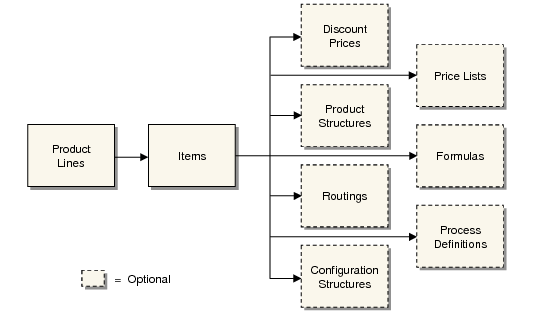
Product Definition Flow shows the major elements that are implemented during product definition, in the order they are set up. Only product lines and items are mandatory. Usage of the other elements varies based on your business requirements and is described in other chapters.
Product Definition Flow
Item data is divided into four categories that roughly parallel how companies typically divide up the maintenance responsibility.
Item Data lists the data types and responsible departments.
Item Data
Data Type | Responsible Department |
General Data | Product Engineering or Research and Development |
Inventory Data | Inventory Control or Materials Management |
Planning Data | Material Planning |
Cost Data | Cost Accounting |
Because some information serves multiple programs, a field that is the responsibility of one particular organization within your company may not be where you expect it. For example, the default list price for a product might be determined by the sales department, but this field is considered cost data, normally maintained by accounting.
To support this potential division of responsibilities, there are two ways to define item master data:
• From Item Master Maintenance (1.4.1), you can enter all item data. This is the only program that can be used to create new item numbers. This method is the most convenient.
• From separate programs, you can create the item record (1.4.3), then enter planning data (1.4.7), inventory data (1.4.5), and cost data (1.4.9). This method offers the most security, because access to the individual programs can be restricted with menu security.
Note: If you are using Service/Support Management, and Service Data in Item Master is Yes in Service Management Control (11.24), you can also update service item attributes in Item Master Maintenance.
If your company manages the same items at multiple sites, you can control, plan, and cost items separately for each site. Data can be differentiated by site using the item-site data programs (1.4.16, 1.4.17, 1.4.18). Programs that process an item at a particular site first looks for item data specific for the site. If none is found, the system uses the item master record.
Internally, the system requires one and only one item master record for each item. Item-site data is optional.