QAD 2017 Enterprise Edition
>
User Guides
>
Master Data
>
Address Data
>
Setting Up Trailer Codes
Setting Up Trailer Codes
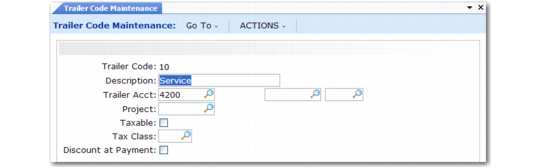
In addition to line item charges and tax amounts, orders often have miscellaneous charges, such as freight and service associated with them. Use Trailer Code Maintenance (2.19.13) to set up trailer codes prior to entering sales orders.
Trailer Code Maintenance (2.19.13)
Trailer codes can be marked as taxable and associated with a GL account. The account must be a valid, active account of type Standard. Enter the GTM tax class of this trailer code. Trailer items are not subject to commission.
You can also indicate whether the trailer code should be discounted at time of payment. If Yes, the trailer charge amount is discounted in the same way as the sales and tax amounts.
Once established, the three most frequently used taxable and nontaxable trailer codes can be specified as defaults in Sales Order Accounting Control (36.9.6). These defaults display on the trailer of every order but can be changed manually. Taxable and nontaxable trailer codes for contracts in Service/Support Management can be specified in SSM Accounting Control (36.9.10).
You can also associate a trailer code with freight lists. If you want this trailer code to be used rather than the ones defined in Sales Order Accounting Control, you must set Use SO Freight List Trailer Code to Yes in Sales Order Accounting Control.
Note: If you are using the Container and Line Charges module, trailer codes are also used to specify line charges during sales order line-item entry. See
QAD Sales User Guide.