Adjustment and Complete Modes
Periodic Costing includes two costing modes and two methods:
• For modes, you can set up Periodic Costing in either of two modes:
Adjustment Mode
Customers who have requirements to produce financial reports based on both standard cost and Periodic Cost (WAVG or FIFO) should use the adjustment mode for Periodic Costing.
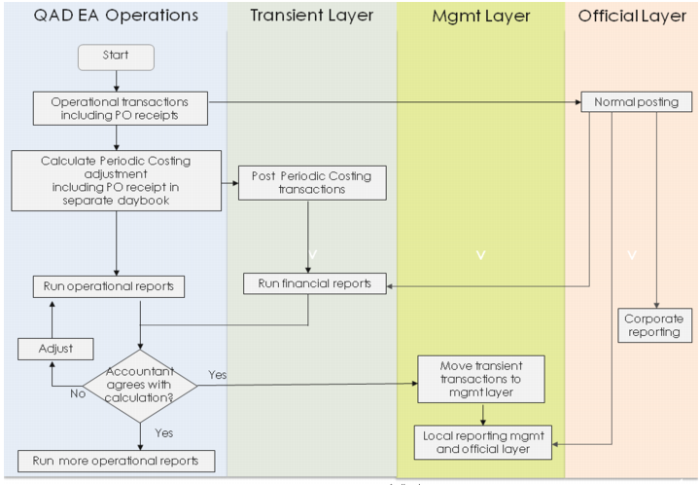
For this purpose, the system makes use of the layers concept in GL. The system posts standard cost transactions to the official layer, and it posts the periodic cost transactions to the transient and management layer once the period closes. Corporate reporting is through the official layer and local reporting is through a combination of the management and official layers.
Adjustment mode means that the operational module generates GL transactions at the standard cost at the same time as the transaction happens. The Periodic Costing calculation then revalues all of these transactions and creates adjustment GL transactions.
When you use adjustment mode, you have instantaneous costing data from standard costs. The system creates general ledger transactions when you create inventory transactions. It creates period cost transactions at the end of the period. You set Create GL Transactions to Yes in Inventory Accounting Control (36.9.2).
Multinational companies can use standard costing to meet their management accounting, internal audit, and corporate requirements, while also using Periodic Costing functions for legal (end of period) accounting or actual costs requirements.
Periodic Cost calculation uses an adjustment method that ensures accurate calculations. The adjustment logic begins by fully reversing the original transactions and then recalculating the PC GL transactions using the full amount to post the transactions to the accounts.
When you use adjustment mode, you can make analysis on inventory valuation based on both standard cost and the calculated periodic costs.
C Periodic Costing, Adjustment Mode Flow present a flowchart for the adjustment mode calculations.
C
Periodic Costing, Adjustment Mode Flow
Complete Mode
In complete mode, the system does not post any standard cost transactions. It only posts periodic inventory costs to the GL at the end of the period. As opposed to adjustment mode, the complete mode only produces one type of financial book based on periodic cost.
In this mode, you set Create GL Transactions to No in Inventory Accounting Control (36.9.2). In this mode, the system continues to post PO receipts transactions. This is required so that AP sub-ledger accounts always match correctly, without having to wait until the Periodic Costing close process posts to the GL.
Complete mode is less frequently in use, although in Brazil and in certain other locales, it may be a preferred best practice. Typically, complete mode is used by local companies operating in locations where standard costing is prohibited.
In complete mode, there will only be Periodic Cost based transactions calculated at the end of the period. These transactions are posted to the transient layer. Once the period is closed, the PC transactions are moved from the transient to the official layer. The following graphic depicts the flow for GL posting, using the complete mode.
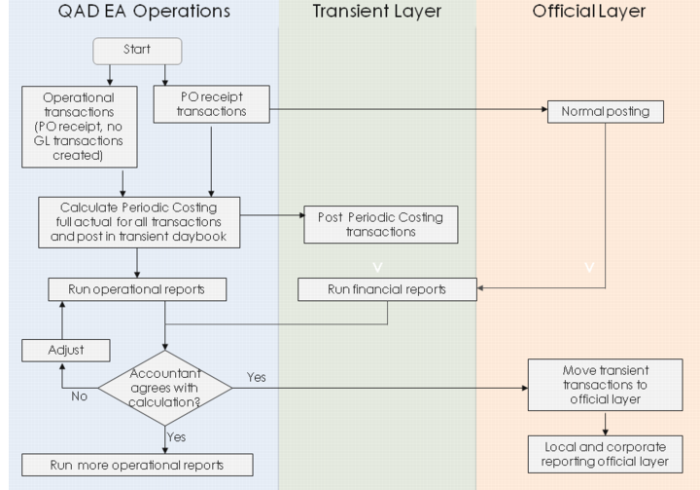 GL Posting Flow, Complete Mode