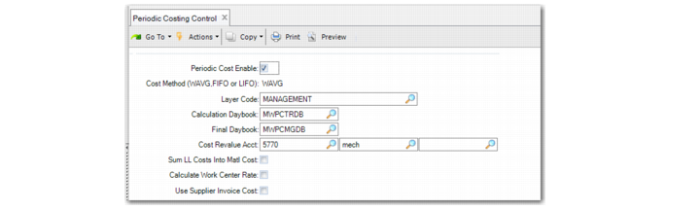
Periodic Costing Control
Use Periodic Costing Control (30.5.24) to enable Periodic Costing functionality and to define several values used in processing.
When you enable Periodic Costing for the first time, the system prompts you to enable Periodic Costing and the PC sub-ledger from the most recent date.
Periodic Costing Control, Initial Enable
When you respond with No, the system leaves the PC Control program. When you respond with Yes, the system displays the fields for Periodic Costing Control.
Periodic Costing Control (30.5.24)
Periodic Cost Enable
Select this option to enable Periodic Costing cost methods for this domain. Periodic Costing method lets you calculate cost averages during a user-specified period using formulas that are based on FIFO or weighted average, specified in the Cost Method field. The system uses the period you define in PC Periods Maintenance (30.5.1.1).
Cost Method (WAVG, FIFO)
Specify how Periodic Costing calculations are done in this domain:
WAVG: Considers the previous period cost and the average of the cost incurred this period.
FIFO: Considers the cost of the receipts of the items in the cost calculation period. This method assumes that the oldest (first) item in stock is issued first.
Note: Once periodic transactions exist in the official or management layer, this field is read-only; you cannot update it any longer.
Layer Code
Specify which accounting layer (management or official) is used for GL postings of periodic costs in this domain. It decides whether you are using adjustment mode or complete mode. The valid value depends on the setting of Create GL Transaction in Inventory Accounting Control (36.9.2).
Management: Use this option when Create GL Transaction is Yes and you want to use Periodic Costing in adjustment mode.
Official: Use this option when Create GL Transaction is No and you want to use Periodic Costing in complete mode.
Calculation Daybook
Specify a daybook that has the:
• Costing daybook type as Periodic Costing
• Daybook control as Operational
• Accounting layer type as transient
The system uses this daybook for posting calculated periodic costs values after the Periodic Cost calculation.
Final Daybook
• Specify a daybook that has:
• Daybook type as Periodic Costing
• Daybook control as Financial
• Accounting layer type as management or official, based on the Periodic Cost calculation mode
The system uses this daybook for posting the final calculated periodic costs values.
Cost Revalue Acct
Specify the account, sub-account, and cost center used to record offset amounts to ensure that inventory accounts are properly balanced when the unit cost for the item in a site is changed. The GL type should be Standard.
Sum LL Costs Into Matl Cost
Specify how lower-level costs are posted to Cost of Goods Sold when Periodic Costing is in use.
Note: This setting applies only to the Periodic Costing calculation. The system uses the field when applying calculated periodic cost to ISS-SO transactions.
No: Add lower-level costs to this-level costs for each cost component and post the total to Cost of Goods Sold.
For example, the total material cost (this-level plus lower level) is posted to Cost of Goods - Material, the total labor cost is posted to Cost of Goods - Labor, and so on, for Cost of Goods - Burden, Overhead, and Subcontract.
Yes: Summarize all lower-level costs into Cost of Goods - Material. Only this-level costs are posted to Cost of Goods - Labor, Burden, Overhead, and Subcontract.
This field does not affect the way costs are calculated or stored in cost sets.
Usually, this field is set to No. Cost of Goods Sold amounts are maintained separately for each cost component. However, in some companies, the material cost for an end item is considered to include all costs associated with purchasing or manufacturing components, as well as any direct material costs. Then, this field is set to Yes.
Calculate Work Center Rate
Specify the method the system uses for calculating labor costs (including setup) and burden costs for the period. This field determines when you directly provide work center rates or provide a total value. During the periodic cost calculation, the system calculates the provided work center rates based on the number of labor hours (setup and run) in the operation history for the work center.
Note: The work center rate here means PC work center rate. Make sure that you have set up the PC work center rate in PC Work Center Rate Maintenance (30.5.3.1). You can update rates for every work center/machine combination or you can load the information using XML (see
Loading Work Center Rates or Cost Adjustments from XML.)
Yes: You provide the total value for the work center and the machine combination for labor (setup and run) and burden.
No: You provide rates for the work center and the machine combination for labor (setup and run) and burden.
Use Supplier Invoice Cost
Select when receipts must be costed using the price on supplier invoices. When Yes and a RCT-PO does not have a matched supplier invoice, the system inserts the cost of the receipt as 0 (zero.).
When Yes and when a pending voucher is not closed and hence, not fully matched with a supplier invoice, the system cannot process the receipt transaction. This displays as an error on the PC Exception Log Browse. For example, the following mismatched data can display in the browse:
No Supplier Invoice for material receipt: message refer to ID:4 @http://qdn.qad.com/display/MFG/PC+Exception+Log
No Supplier Invoice for logistic charge: message refer to ID:7 @http://qdn.qad.com/display/MFG/PC+Exception+Log