PC Accounting Reports
The following topics discuss the reports in the PC Accounting Reports Menu (30.5.17).
PC & Standard Costs Report
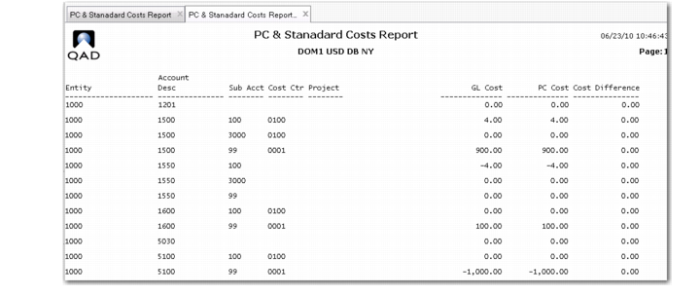
Use the PC & Standard Costs Report (30.5.17.1) to display Periodic Costing and standard costs by date range and entity. The report displays the entity, account description, sub-account, cost center, and project. You can optionally display statutory currency and SAF codes.
Note: In Periodic Costing, Summarized Journal in Inventory Accounting Control (36.9.2) can work together with SAF.
PC & Standard Costs Report (30.5.17.1)
PC Inv Cost And Account Reconcile
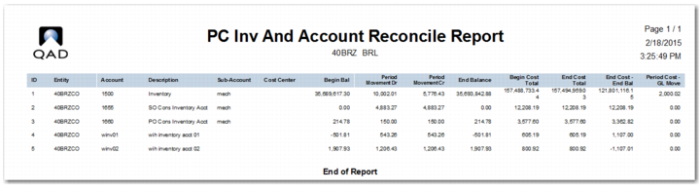
Use PC Inv Cost and Account Reconcile (30.5.17.10) to review operational inventory movements and GL account movements.
The report displays when the inventory cost and GL account match and displays when item level cost and GL match for an account and period. You can see the difference between GL and operational inventory transaction totals using the following filters as report criteria:
Period: Single choice (cannot be blank)
Account: Multiple choice, or leave blank for all values
Sub-Account: Multiple choice, or leave blank for all values
Cost Center: Multiple choice, or leave blank for all values
Display Item: Yes/No
Drill down threshold: Show Item details if the difference is greater than this amount.
You can set criteria for data to display. The system displays the ID, entity account, sub-account, cost center, beginning and ending balances, period movement debit and credit, beginning and ending total cost, the ending cost ending balance, and more.
PC Inv Cost and Account Reconcile (30.5.17.10)
PC Cost and Account Reconcile
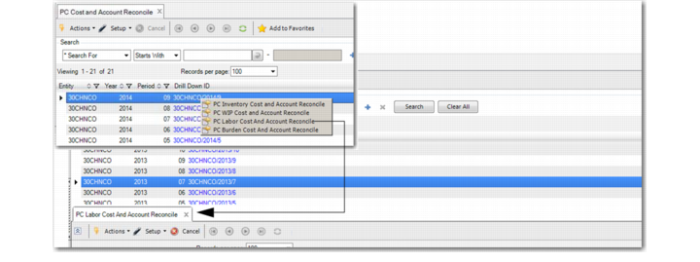
Once you complete Periodic Costing calculation, you can use PC Cost and Account Reconcile Browse Collection (30.5.17.13) to help you reconcile the item movements, WIP movements, and account movements. The initial screen displays the entity, year, period, and a list of drill down links for the entity.
The drill down column links, listed by date, lead you to more reconciliation data. When you right-click on a dated listing in the column, the system displays a menu for the following:
• PC WIP Cost and Account Reconcile
• PC Labor Cost and Account Reconcile
• PC Burden Cost and Account Reconcile
When you click on a menu item, the system displays a supporting tab of additional information. You can then drill down into details to analyze data.
PC Cost and Account Reconcile, Drill Down
PC Work Center Cost Reconcile
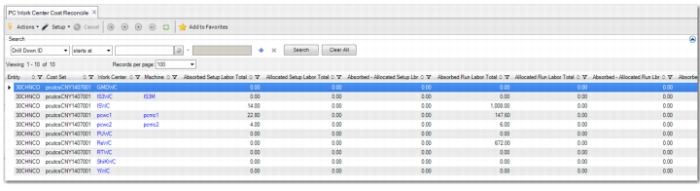
Use PC Work Center Cost Reconcile (30.5.17.14) to display absorbed versus allocated work center cost data. The browse displays the entity; cost set; work center; machine; absorbed and allocated setup labor totals, run labor totals, and labor and machine burden totals.
PC Work Center Cost Reconcile (30.5.17.14)
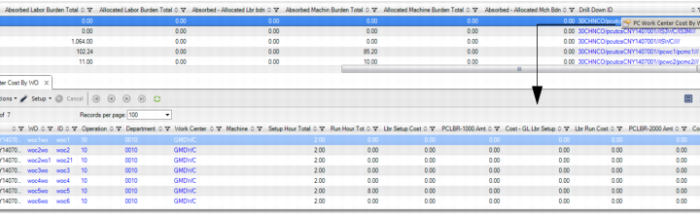
You can drill down to view work centers by right-clicking a work center, and you can drill down to view work center machines by right-clicking a machine. When you right-click on a record in the DrillDownID column, the system displays the PC Work Center Cost by WO button. When you click the button, you can drill into the details that make up the summary shown in the PC Work Center Cost Reconcile browse. When the PC Work Center Cost by WO supporting browse displays, you can then further drill down to display other browses as follows:
Column with Button | Supporting Browse |
WO | Work Order Master |
ID | Work Order Lots |
Operation | Routing Operations |
Department | Department Master |
Work Center | Work Centers |
PC Work Center Cost Reconcile, Drill Down
PC Work Center Rate Inquiry
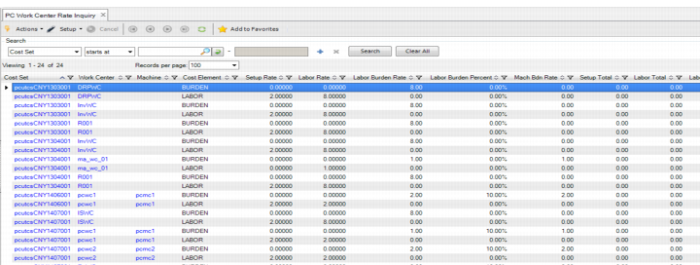
When reconciling work center rates, you can use Work Center Rate Inquiry (30.5.3.2) to display work center rate and totals data. Use the data to validate that the work center totals and rates were loaded correctly before you run PC calculation. After you run PC calculation, you can validate the calculated work center rates. Like other browse collections, you can right-click to display additional buttons, then click the button to view supporting browse data.
PC Work Center Rate Inquiry (30.5.3.2)
PC Cost Fluctuation Report
Use PC Cost Fluctuation Report (30.5.17.16) to determine when any item’s unit cost varies a lot compared with previous periods after you run PC calculation.
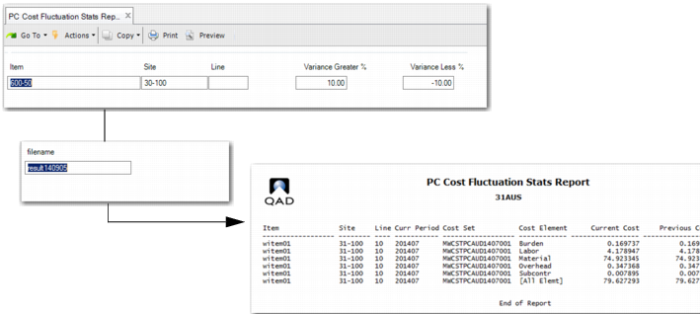
The report displays item unit cost variance for the current period. You can filter on item, product line, site, variance % greater than or less than on any element, or total unit cost. Columns include Item, Description, Product Line, Site, Current Period (Bucket), Cost Set, Element/Total, Current Unit Cost, Prev Unit Cost, and Variance%, (current unit cost-previous unit cost)/previous unit cost in %).
For WAVG, the report lets you compare:
• The unit cost of the prior period
• By element or total
For FIFO, the report lets you compare:
• The WAVG unit cost of all previous periods:
sum (unit cost * unconsumed qty)/sum (unconsumed qty)
• When the sum (unconsumed qty) of all previous period is 0, you can compare with the average unit cost of all previous periods. The report displays 99 when the WAVG or AVG previous period cost is 0.
• By element or total
To run the report:
1 Enter the item, site, and product line number.
2 Enter the variance greater and variance less than percentages.
3 Click Next.
The system displays the default file name for a file that holds output to archive after you run the report.
4 Accept the default file name or specify another file name.
PC Costs Fluctuation Stats Report (30.5.17.16)
PC Unit Cost Calculation Report
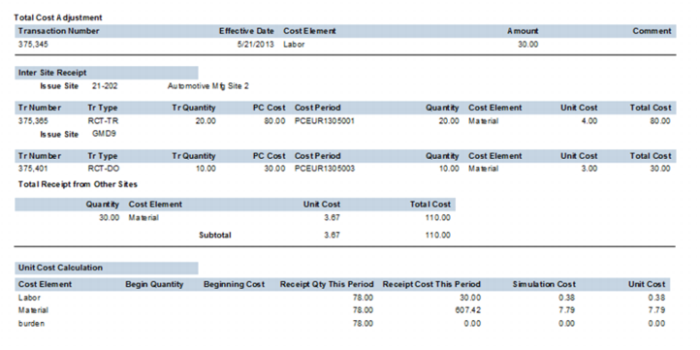
PC Unit Cost Calculation report (30.5.17.17) shows how Periodic Costing calculated the unit cost for the item and all the data that went into the calculation. It is an extensive report that consists of sections that mimic how the PC Calculation processes. The report has sections for the following:
• Prior period cost
• Unit cost adjustments
• PO receipts
• WO receipts and close, including all costs added to WIP
• Intersite transfer receipts
• Total cost adjustments
• Unit cost calculation summary
PC Unit Cost Calculation report presents data in each section as it accumulates the total quantity and values received; see
PC Unit Cost Calculation Report.
PC Unit Cost Calculation Report