PC Unit Cost Adjustment
Use PC Unit Cost Adjustment (30.5.5.1) to create a cost adjustment to previous period periodic unit cost. You can make adjustments in unit cost by increasing or decreasing values per cost element. The system creates the PCCST-AD inventory transaction history record.
You perform a unit cost adjustment based on a previous period ending balance. That is, the value of the beginning balance for the new GL period for which you perform periodic coting calculation has changed and you apply the changed value to all issues. The system creates a GL transaction for the item against its inventory account that represents the change in total inventory value due to the unit cost adjustment.
Navigation
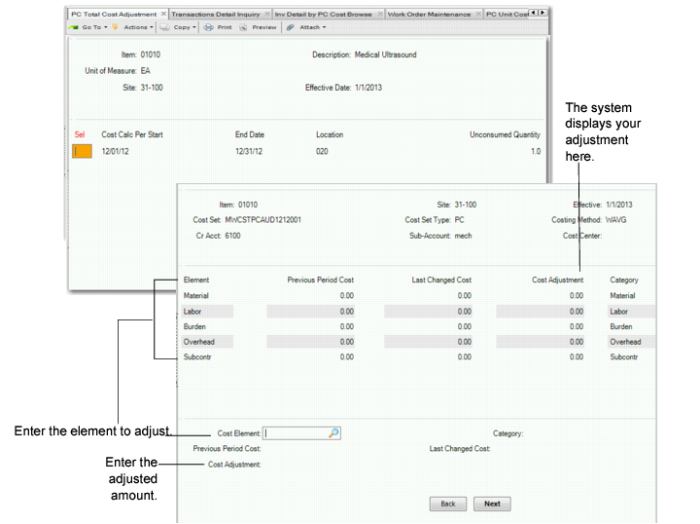
Enter the item number, site, and effective date for the unit cost adjustment. The system displays the Cost Set Selection frame. Select the cost set, then enter the credit account, sub-account, and cost center. The system uses the item’s default inventory account as the debit account, which cannot be modified by this program. When you first enter data, the system displays elements from the cost set.
Enter the element whose cost you want to adjust in the Cost Element field; for example, enter Material. Then, enter the amount you want the adjusted cost element to be. You cannot enter a negative amount for an element. When you press Go, the system prompts you to confirm that all information is correct. You can use Transaction Detail Inquiry (3.21.1) and Transaction PC Cost Browse to view changes.
The following depicts the program frames. Note that, in a FIFO environment, the Selection Frame lets you select to make adjustments for different periods; you select the date for which you want to make adjustments. The WAVG method shows the unconsumed quantity by location.
PC Unit Cost Adjustment (30.5.5.1)
Item Number
Enter the item number for which you want to adjust cost elements.
Site
Enter the site for the item.
Effective Date
Enter the effective date for the cost adjustment.
Account
Enter the account for the adjustment.
Sub-Account
Enter the sub-account for the adjustment.
Cost Center
Enter the cost center for the adjustment.
Adjustment AMT
Accept or enter a new amount in dollars and cents for the element.
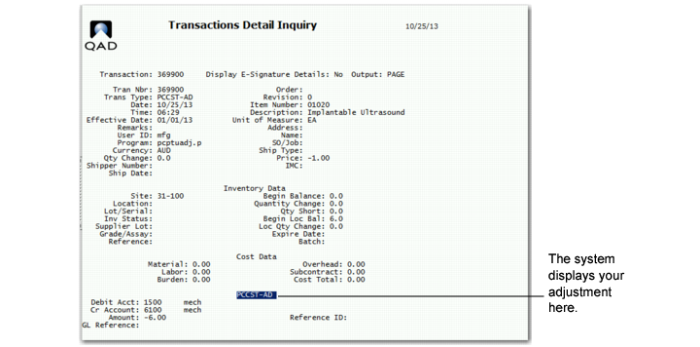
You can keep track of your adjustments using Transaction Detail Inquiry. The browse shows you the Periodic Costing adjustments, as shown in
Transaction Detail Inquiry.
Transaction Detail Inquiry
Method to Create a Prior Period for Newly Added Items
You can now use PC Unit Cost Adjustment (30.5.5.1) to create a prior period for new items that you added after Periodic Costing initialization.
Previously, when Periodic Costing calculated the unit cost—referred to as the prior period cost—for new items that you added after Periodic Costing initialization, there was no prior period to which to refer. Now, for FIFO and WAVG methods, you can establish an initial cost set prior to the period for which you added the item using PC Unit Cost Adjustment.
Example: The current Periodic Costing period is June, and you create item01. You use PC Unit Cost Adjustment to adjust the cost of item01 for May. The system creates a cost set of item01 for May with an unconsumed quantity equal to 0 (zero) and the unit cost set to user adjusted. Additionally, when there is no previous period cost, you can use PC Unit Cost Adjustment, then modify the unit cost for the last bucket in the latest period. Or, when the previous period only has one bucket with a quantity of 0 and a unit cost set to any, you can use PC Unit Cost Adjustment to modify the one bucket.
The system initializes the unit cost; then, applies the unit cost to the transaction cost when the following exist:
• You use WAVG and add new items.
• There is no order receipt.
• There is cycle count or other transactions that require costing.
When you add the new items to the system, the first period does not have order receipts so that the system cannot calculate a unit cost. However, when you have a first-period transaction that requires costing, such as a cycle count or issue transaction, the system now sets the unit cost to that of the prior period, then it costs the transactions with this unit cost. You establish the prior period unit cost in PC Unit Cost Adjustment.
View Updated Unit Cost and Historical Unit Cost
You can view the following after you perform a PC unit cost adjustment to find the updated cost:
• Inv Detail by PC Cost Browse always displays the up-to-date unit cost.
• Inventory and SF Movement Report (mod3) displays the historical cost as of the period of the cost set you select.
• Inventory and WIP Balance Report (mod7) displays the historical cost as of the period of the cost set you select.
• Transaction PC Cost Browse Collection to see the details of the Unit Cost Adjustment transaction by cost element.