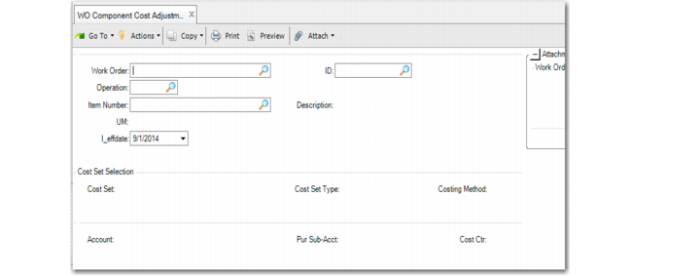
WO Component Cost Adjustment
Use WO Component Cost Adjustment (30.5.5.13) to specify a WIP cost adjustment that lets you modify a component’s costs for its related categories for a work order or a cumulate order.
The work order or cumulative order must be a valid, system order, and the components must be valid in the work or cumulative order, as well as operations. The work order/cumulative order must be open for the period/year the adjustment is being reported.
The system creates a periodic cost adjustment GL transaction for the WIP cost adjustment. When statutory currency is enabled for the domain, the system calculates the WIP cost adjustment transaction, based on the effective date provided. The periodic cost adjustment transaction is separate from the CST-ADJ transactions created for standard cost. An adjustment account for this WIP cost adjustment transaction should be specified. The process cost adjustment transaction impacts the specified WIP account and the adjustment account.
Navigation
Specify the period/year for this adjustment. Enter the work order number, ID, and operation; then, specify the item number and effective date. The system displays the Cost Set Selection frame. Select the cost set, then enter the account, sub-account, and cost center. The system displays elements from the cost set.
Individually adjust costs in the Adjustment Amt field for material, labor, burden, and so on. You can enter a negative amount for an element; however, the total must be positive.
For each element, specify Yes to change the element to a primary element. You cannot change a primary element to a non-primary element. The system sums the total cost adjustment for the period, and compares the adjustment against receipts on the element level.
WO Component Cost Adjustment (30.5.5.13))
Work Order
Enter the work order for the cost adjustment.
ID
Enter the work or cumulative order ID for the cost adjustment.
WO Operation
Enter the work order operation for the cost adjustment.
Item Number
Enter the item number for which you want to adjust cost elements. The item must be a valid component in the BOM of this work order/cumulative order.
Site
Enter the site for the item.
Effective Date
Enter the effective date for the cost adjustment.
Account
Enter the account for the adjustment.
Sub-Account
Enter the sub-account for the adjustment.
Cost Center
Enter the cost center for the adjustment.
Adjustment AMT
Accept or enter a new amount in dollars and cents for the element.