Log Files
You can examine the system log files to determine what took place in the system and how long it took. When users make requests to the back-end processor, or server, the system tracks the request in the appserver log file as well as in the client log file.
The client log file is on the user PC and only contains log messages pertaining to that user’s activity. The appserver log file, on the other hand, is shared by all users. So it contains log messages pertaining to activity of all users.
Note: For additional information on reading log files, refer to the following link:
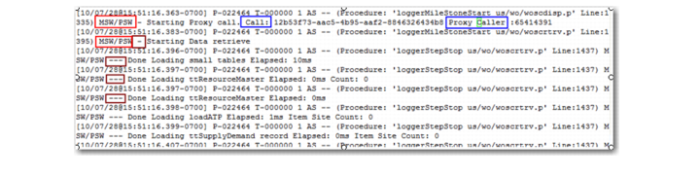
To effectively troubleshoot an issue, you should be able to associate a client request with a server response. Since the server log is for all clients, associating client requests with server response can be very difficult. To facilitate this association, both log files show Call ID and Proxy Caller ID. In addition, all messages are prefixed with the words MSW/PSW.
.
Appserver Log File, Proxy Caller
In the log file, you can determine when a user starts data retrieval as the log file depicts the start and finish of the data retrieval in milliseconds. The information can help you determine exactly how many records were retrieved, the type of record, how long the retrieval took, which user retrieved the records, and so on.
Knowing this can help you curtail long user retrievals. When retrieval issues arise, you can help users resolve the issues by successfully employing the MSW/PSW search filters or disabling functions through the user preferences.
You can find the client log file in .NET UI. At the top menu, select Help, then About, then View Log. If you operate on the appserver side, the system displays the appserver log file; if you operate on the client side, the system displays the client log file.
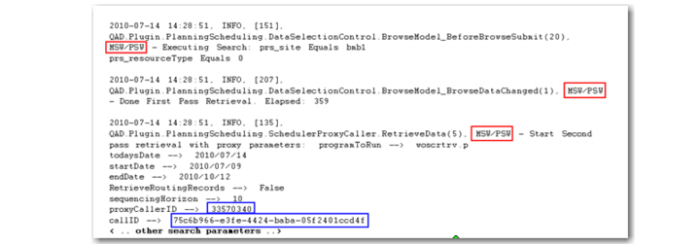
Each MSW or PSW request is preceded by the word MSW or PSW; see figure
. Client Log File.
.
Client Log File
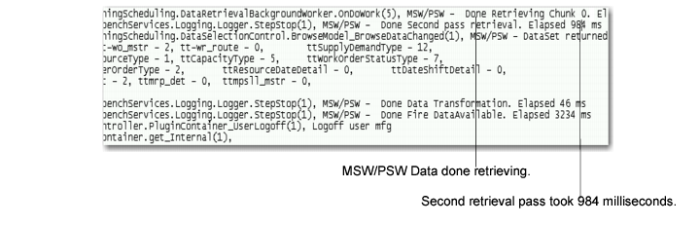
The following graphic shows that the first pass of the data retrieval on the server took 259 milliseconds.
.
Appserver Log File, Timing
If you work on the client, the system retains a client log file that uses the same format and keeps track of the same events and requests that the appserver log file tracks.